WooCommerce plugin · Product tables · Order forms · Quick view · Free

Demfilz Product Table for WooCommerce

A shop grid is fine for browsing, but slow when a customer knows what they want: one product page per item, back, next item, again. This plugin shows your catalogue as one searchable, sortable, filterable table with quantity boxes, variations in the row and add to cart without leaving the page. Tick ten rows and add them all at once. It suits order forms, wholesale and trade ordering, spare parts lists and menus.

v1.0.0 · WordPress 6.3+ · WooCommerce 7.0+ · PHP 7.4+ · free · not on WordPress.org yet

Search, sort and filter every column Quantities, variations and multi-select add to cart Shortcode, saved tables or a block

The columns you choose

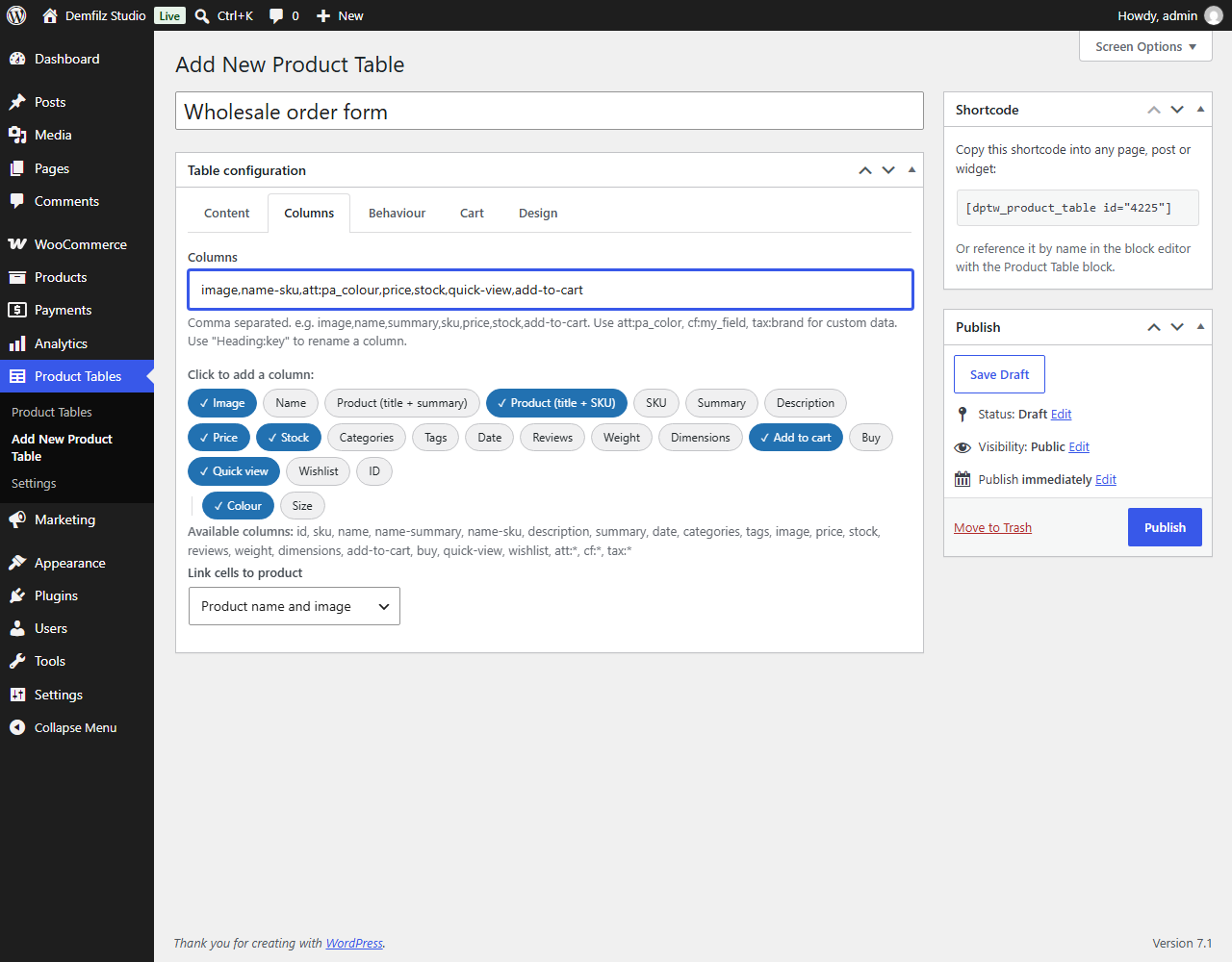
Image, name, SKU, description or summary, date, categories, tags, price, stock, reviews, weight, dimensions, add to cart, buy, quick view and wishlist, in any order. Add product attributes (att:pa_colour), custom fields (cf:my_field) or any taxonomy (tax:brand), and rename any column with Heading:key. Click a column heading to sort by it, with numbers and dates in value order.

Search and filters that never come up empty

Instant search matches names and SKUs, with suggestions as you type. Filter dropdowns cover categories, tags, attributes, any taxonomy and a price range, above the table or in a left sidebar. The dropdowns are searchable and linked: choosing one narrows the others to options that still return products, so a customer never filters down to nothing.

Ordering without the clicks

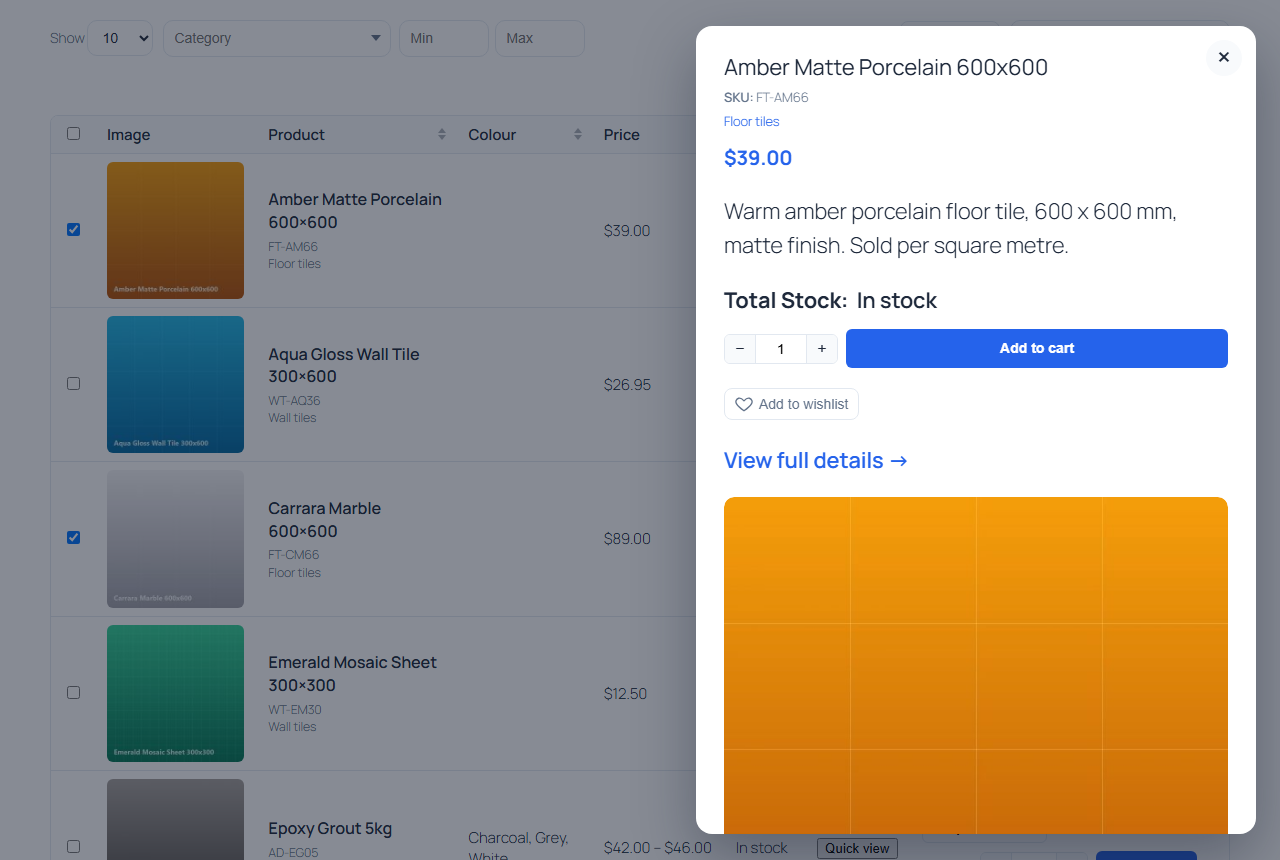
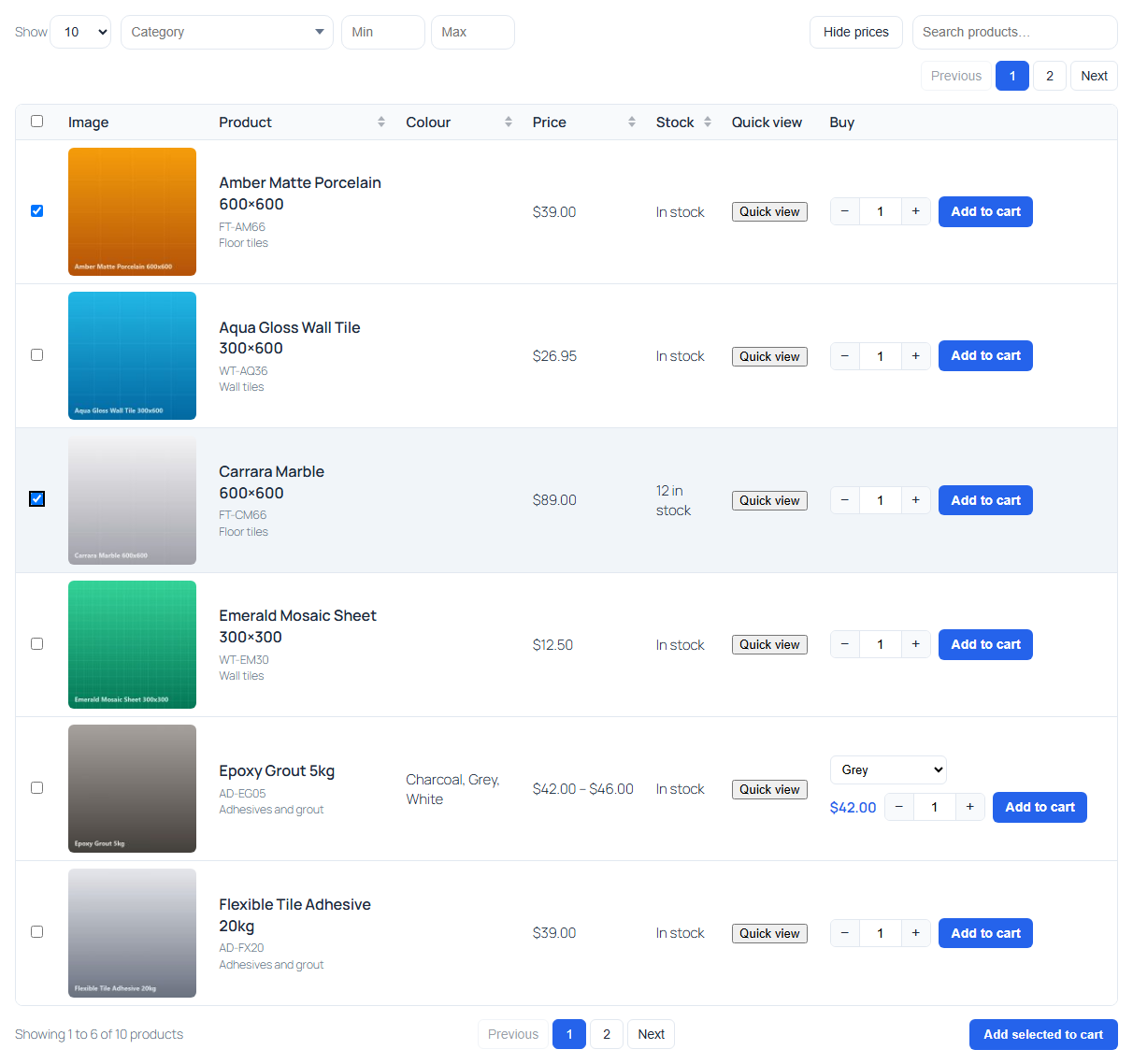
Quantity steppers respect each product's minimum, maximum, step and sold-individually settings, decimal quantities included. Variable products show their options in the row, or every variation gets its own row. Add to cart works in place and the mini cart updates straight away; tick several rows and Add selected to cart adds them all. A quick view panel slides in with the gallery, zoom, price, stock, description and add to cart.

Built for big catalogues

In lazy load mode only the current page of products is queried, with search, sorting and filtering done on the server, so a table over thousands of products stays quick. Pages behind full-page caching keep working: an expired security token is refreshed on the first request and the request is retried.

Looks at home, on any screen

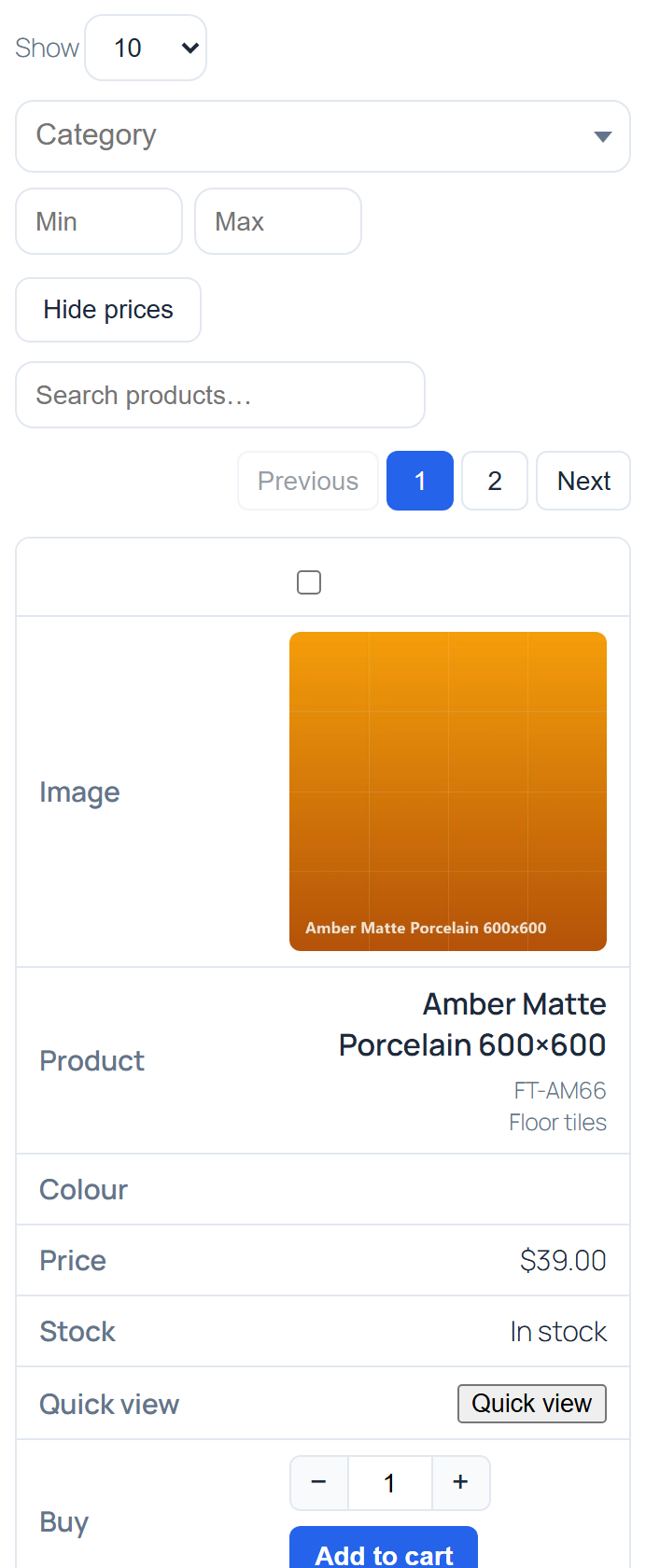
Eight designs (default, minimal, bordered, striped, dark, navy, midnight and aqua) with accent, header, hover and border colours, boxed or full width. On phones every row becomes a stacked card with the column names beside the values. Optionally lay your product pages out like the quick view, and replace the shop page and category archives with a table.

Tested in a real store

Passes the WordPress Coding Standards with zero errors and zero warnings and is clean against the official Plugin Check. 230 automated checks cover rendering, queries, filters, variations and the security checks on every request, and 59 browser checks cover the tables, quick view, cart, wishlist, settings and the block editor.

Nothing leaves your site

No external services, no tracking, no account. Every request is signed with a security token and checked first, and anything a theme or another plugin adds to a cell is passed through WordPress's own HTML filter.

Works with WooCommerce, not around it

Real WooCommerce carts and prices, stock and quantity rules, simple, variable, grouped and external products, High-Performance Order Storage, and a block for the block editor.

How it works

Your first table in two minutes

1

Install and activate

Upload the zip under Plugins, Add New Plugin, Upload Plugin, and activate it. WooCommerce must be active.

2

Set your defaults

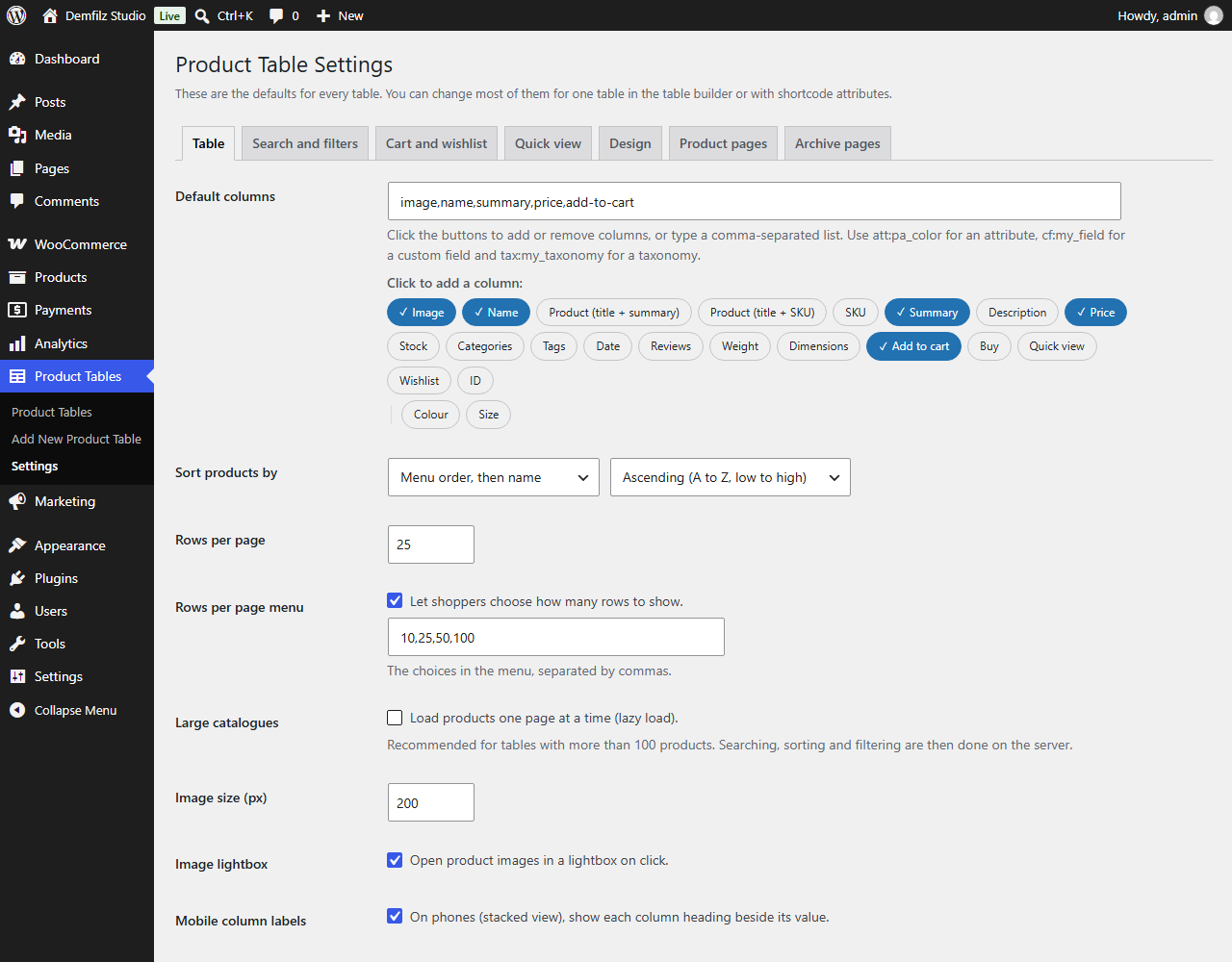
Under Product Tables → Settings, choose the default columns, filters, cart options and design.

3

Add a table

Put [dptw_product_table] on a page, build a saved table under Product Tables, or insert the Product Table block.

4

Fine-tune per table

Pick categories, columns, filters and a design for each table in the builder or with shortcode attributes.

Read the full setup guide →
Demfilz Product Table: a product table card with coloured thumbnails, text rows and blue add buttons, and a green add-to-cart badge

Why it matters. Trade and repeat customers know their SKUs. Letting them search, set quantities and add twenty lines from one page turns a ten-minute order into a one-minute order, and that is what brings them back.

See it

From catalogue to cart on one page

Seven screens from the plugin, captured on a standard WordPress site with a sample tile shop.

A product table on a tile shop order form: category and price filters, search, Hide prices, image, product name with SKU and category, colour, price, stock, Quick view and quantity steppers with Add to cart, two rows ticked and an Add selected to cart button
An order form with filters, variations and multi-select.
The quick view panel sliding in from the right over the table: product name, SKU, category, price, description, stock, quantity and Add to cart, Add to wishlist and the product image
Quick view.
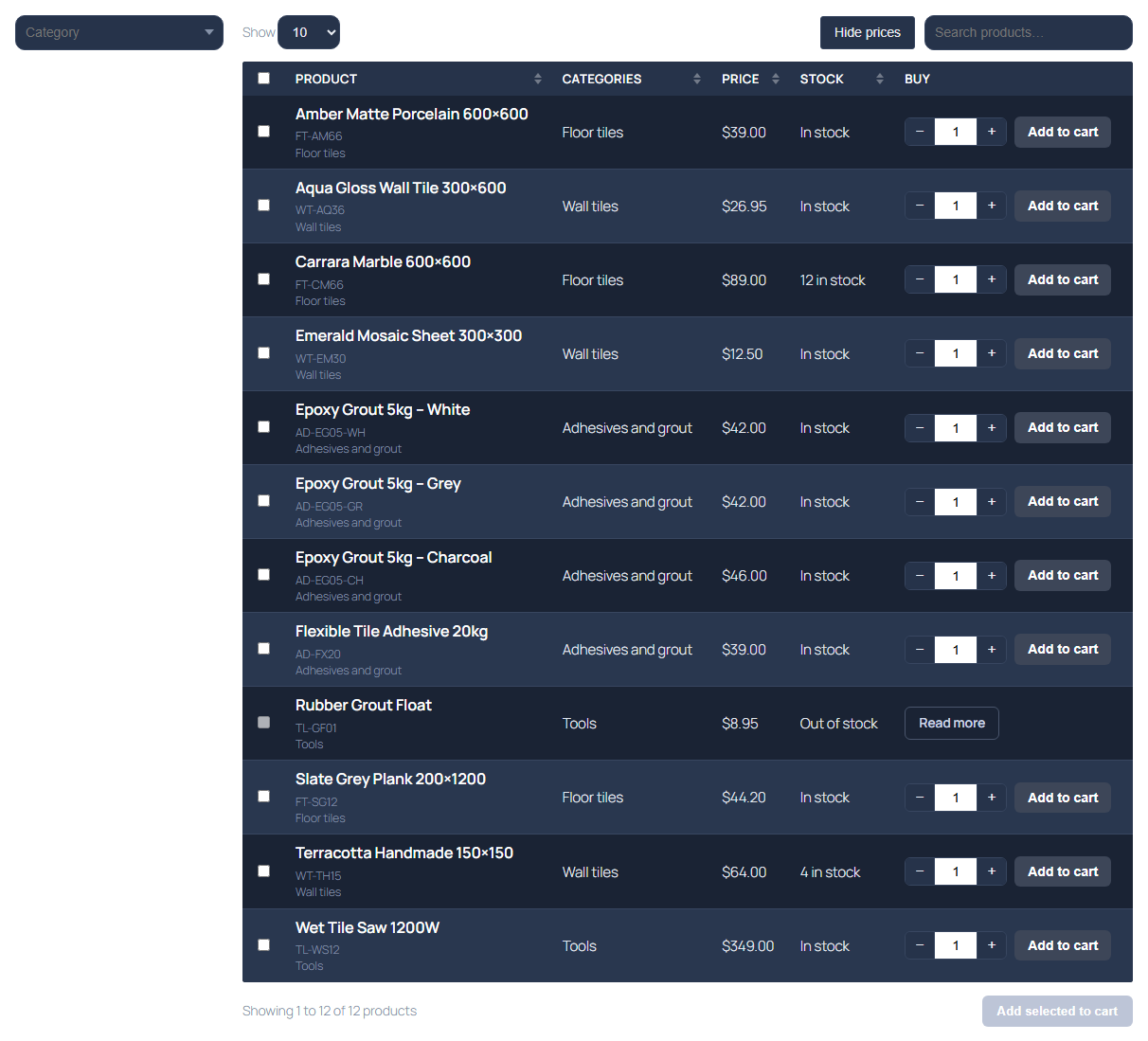
The navy design with the category filter in a left sidebar: every variation of the epoxy grout on its own row, prices, stock and Add to cart buttons
The navy design, filters in a sidebar, one row per variation.
The table on a phone: each product becomes a stacked card with the column names beside the values
On a phone.
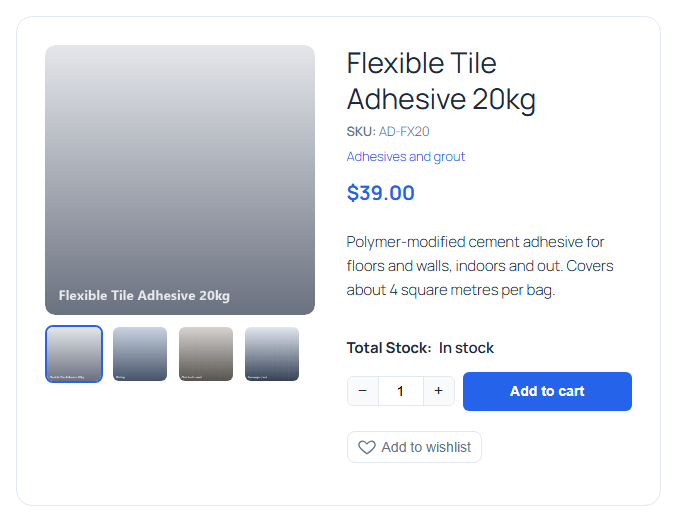
The optional product page layout: the gallery with thumbnails beside the title, SKU, category, price, description, stock, quantity, Add to cart and Add to wishlist
The optional product page layout.
The table builder in WordPress admin: Content, Columns, Behaviour, Cart and Design tabs, clickable column buttons and the shortcode box
The table builder.
The Product Table settings: seven tabs, with the Table tab open on default columns with clickable column buttons, product sort and rows per page
Settings.
Download

Get Demfilz Product Table

Free, and ready to install today.

Demfilz Product Table for WooCommerce v1.0.0

Free · WordPress 6.3+ · WooCommerce 7.0+ · PHP 7.4+ · not on WordPress.org yet

Download free (.zip)

Setup guide →

Upload the zip under Plugins → Add New Plugin → Upload Plugin, activate, then open Product Tables → Settings. No account required, no external services, HPOS compatible.

FAQs

Common questions

How do I add a table to a page?

Three ways. Put the [dptw_product_table] shortcode on any page, build a table under Product Tables and paste its [dptw_product_table id="123"] shortcode, or insert the Product Table block in the block editor and pick a saved table.

Can customers buy variations from the table?

Yes. With variations="dropdown" customers pick the options in the row and the price updates; with variations="separate" every variation gets its own row, with its own SKU, price and add to cart.

Can customers add several products at once?

Yes. Turn on the checkboxes and "Add selected to cart": customers tick the rows they want, set the quantities and add them all in one go. The mini cart updates without a page load.

Does it cope with a big catalogue?

Yes. Turn on lazy load and only the current page of products is queried, with search, sorting and filtering done on the server. It is the setting to use from about 100 products up.

Does it work with page caching?

Yes. If a page comes from a cache and carries an expired security token, the first request gets a fresh token back and is retried automatically, so add to cart, quick view and the lazy table keep working.

Does it work with my theme?

It works with block themes such as Twenty Twenty-Five and with classic themes. The optional shop and product page layouts use the theme's own header and footer, and on phones the table turns into stacked cards.

Is any data sent anywhere?

No. The plugin does not contact any external service. The wishlist, the hide prices choice and the table's current filters are kept in the visitor's own browser.

Is it on WordPress.org, and where do I get it?

It is not on the WordPress.org plugin directory yet. Download the plugin zip from this page and upload it under Plugins, Add New Plugin, Upload Plugin.

Need something more for your store?

Customer-specific price lists, reorder from past orders, ERP stock in the table, quote requests from selected rows - this is the kind of thing we build. Tell us how your customers order and we will come back with a plan and a fixed quote.