See it
From rule to checkout
Six screens from the plugin, captured on a standard WooCommerce store.
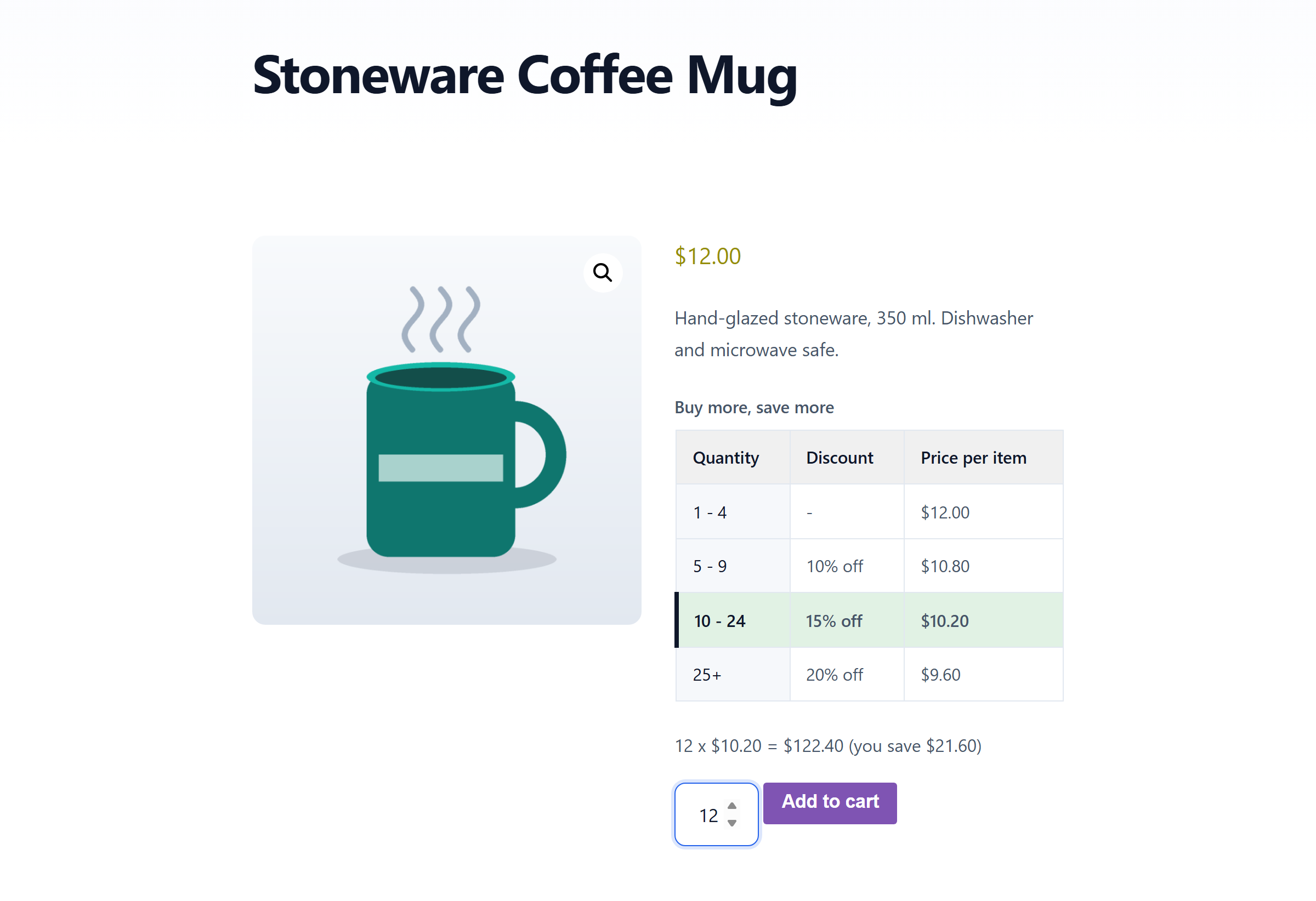
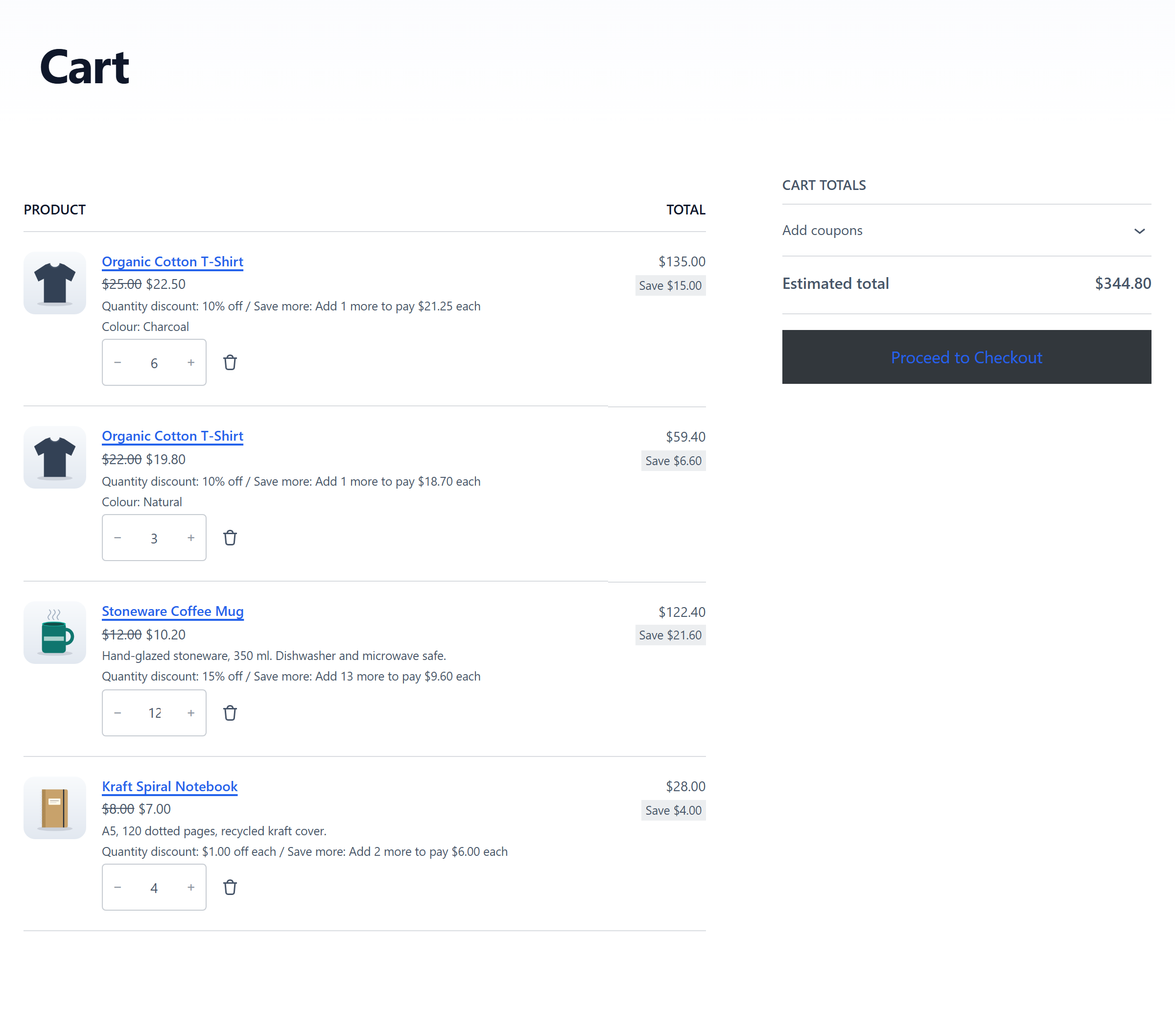
Buy more, pay less per item. Set quantity tiers such as 10% off 5 or more, 15% off 10 or more and the cart prices every line from the tier its quantity reaches. Customers see the tiers on the product page before they buy, the row for their quantity lights up with a live total, and the cart tells them how many more to add for the next saving.
v1.0.0 · WordPress 6.2+ · WooCommerce 8.0+ · PHP 7.4+ · free · WordPress.org review in progress
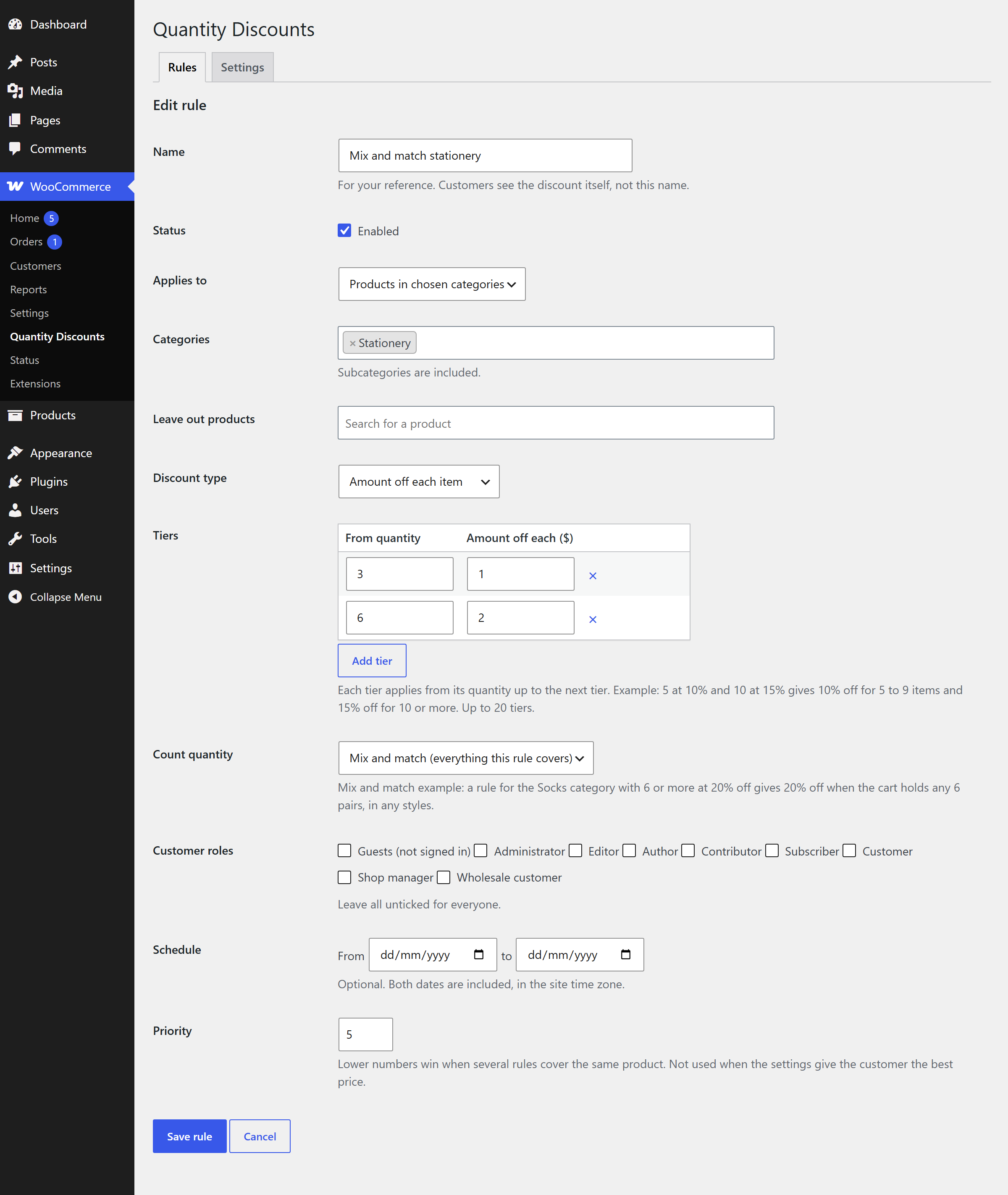
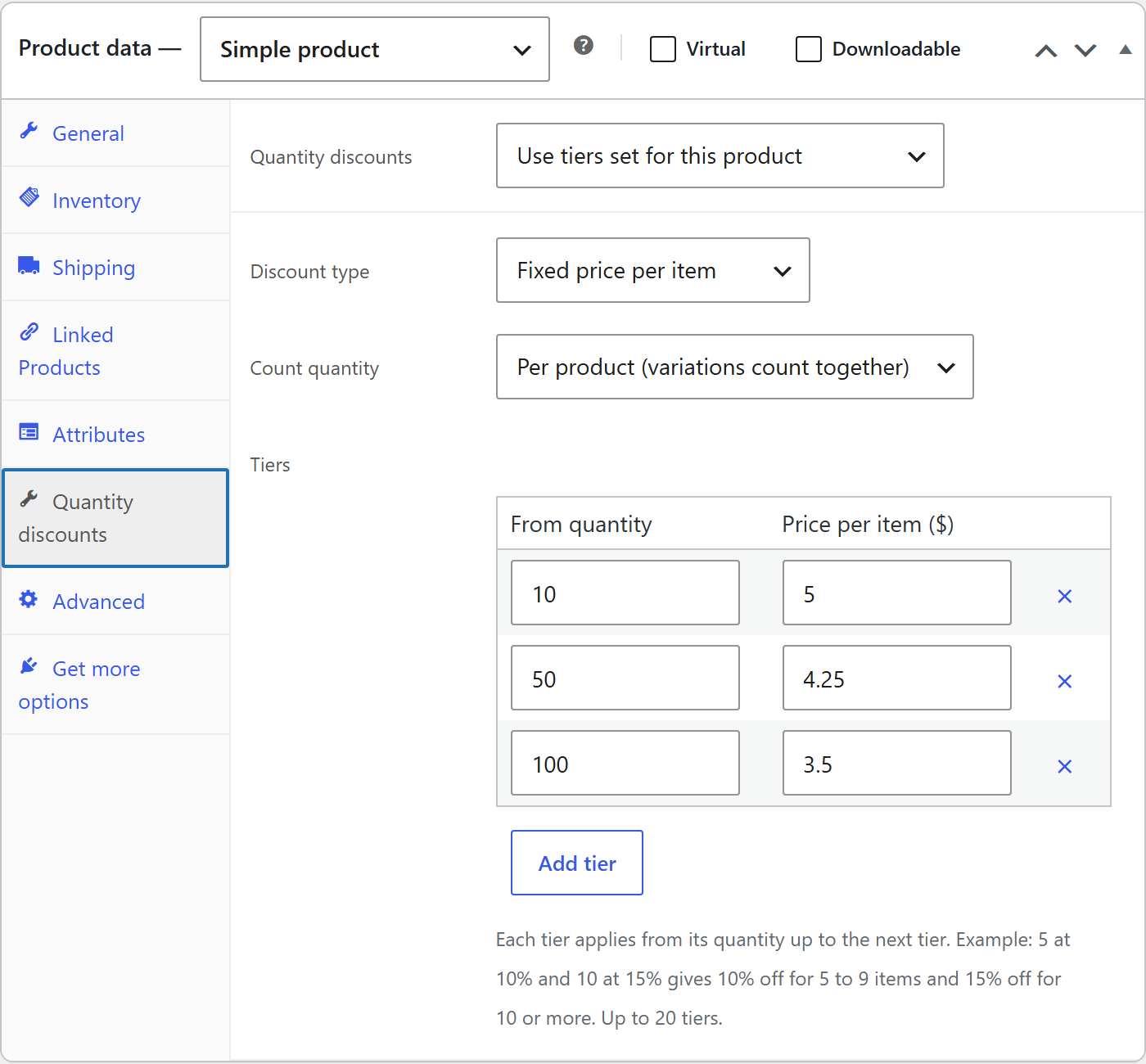
A percentage off each item (5+ at 10% off, 10+ at 15% off), an amount off each item (12+ at $1.50 off each), or a fixed price per item (1+ at $10.00, 10+ at $8.50, 50+ at $7.00), which is how wholesale price breaks are usually written. Each tier applies from its quantity up to the next one, and the whole line gets the discount, not only the items above the threshold.
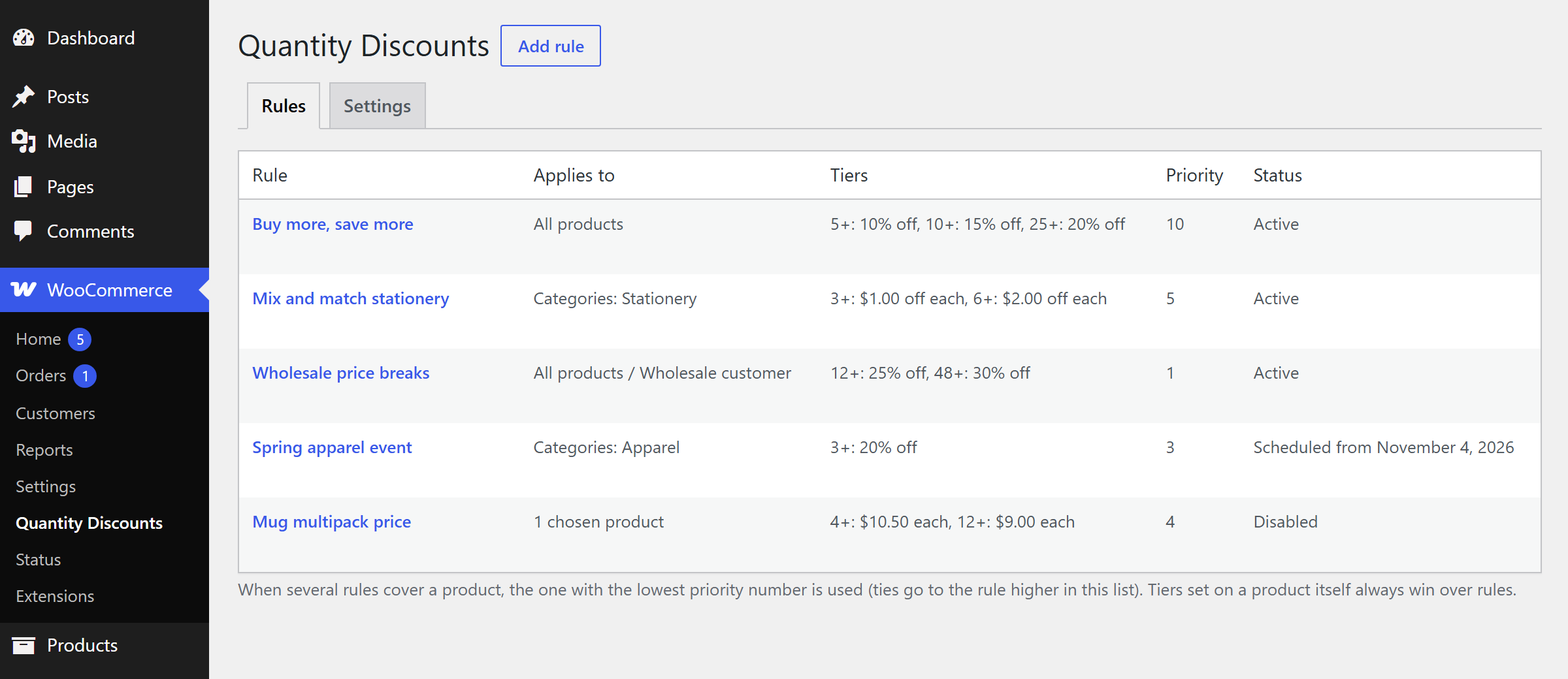
A rule covers every product, chosen categories (subcategories included) or chosen products and variations, and can leave individual products out. Limit it to customer roles, such as wholesale customers only, or to guests, and schedule it with start and end dates. When several rules cover a product, the lowest priority number wins, or let the plugin give the customer the best price. Discounts never stack. Any product can also carry its own tiers from its Quantity discounts tab, or opt out entirely.
Per product: all variations of a product count together, so 2 small and 3 large shirts make 5 shirts. Per cart line: each variation counts on its own. Mix and match: everything a rule covers counts together, so "any 6 notebooks for $2 off each" works across styles.
A pricing table above or below the add to cart button (or wherever you put the shortcode) with the quantity ranges, the discount and the price per item. The row for the chosen quantity lights up and a line shows the total and the saving as the quantity changes; variable products fill in each variation's prices when it is picked. In the cart, the original price struck through, the discount under the item and a hint such as "Add 3 more to pay $8.00 each". An optional "Buy more, save up to 20%" line under products on shop and category pages.
The discount is set on the cart line itself, not added as a negative fee, so taxes, coupons, shipping and payment gateways all see the discounted price. It works with the classic cart and checkout and the cart and checkout blocks, shows in the mini cart, and every order line records the discount it received, so it appears on the order screen, in emails and on invoices.
Six screens from the plugin, captured on a standard WooCommerce store.
Passes the WordPress Coding Standards with zero errors and zero warnings, and clean against the official Plugin Check. Nonce and capability checks on every save, sanitised input, escaped output, an automated test suite of the pricing engine, and independent review passes before release.
No external services, no tracking, no account. Your product prices are never rewritten: the discount is worked out in the cart, so deactivating the plugin leaves the store exactly as it was.
One small script and one stylesheet, loaded only where the pricing table or the shop badge appears, and kept out of minifier bundles so an update never serves stale. Catalogue pages and queries are untouched.
Upload the zip under Plugins, Add New, Upload Plugin and activate. WooCommerce must be active.
Open WooCommerce → Quantity Discounts → Add rule. Choose what it applies to, the discount type and the tiers, then save.
Open a product the rule covers: the pricing table appears above the add to cart button. Change the quantity and watch the row and the total update.
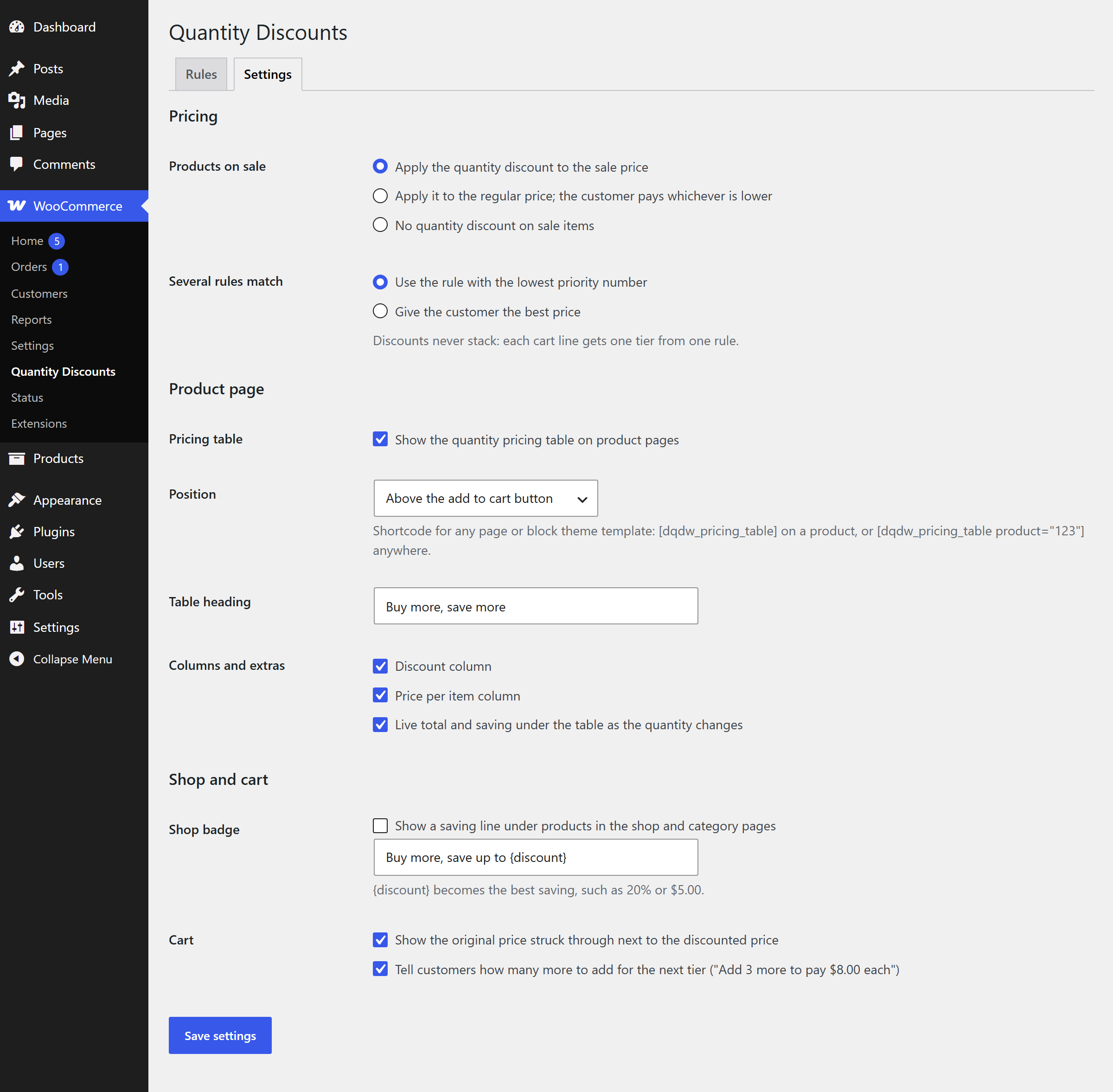
Give single products their own tiers from their Quantity discounts tab, and choose how sale prices, overlapping rules, the table and the cart behave under Settings.
Why it matters. A visible price break turns "I need four" into "I'll take five". Showing the saving on the product page, and reminding shoppers in the cart how close they are to the next one, lifts the average order without a site-wide sale.
Free, and ready to install today.
Free · WordPress 6.2+ · WooCommerce 8.0+ · PHP 7.4+ · submitted to WordPress.org - review in progress
Download the plugin (.zip)Upload the zip under Plugins → Add New → Upload Plugin, activate, then open WooCommerce → Quantity Discounts. No account required, no external services, HPOS compatible.
Each tier applies from its quantity up to the next tier. With 5 at 10% and 10 at 15%, one to four items are full price, five to nine are 10% off and ten or more are 15% off. The discount applies to every item on the line, not only the ones above the threshold. A tier can start at 1, which turns the fixed price type into a full price list such as 1+ at $10, 10+ at $9 and 50+ at $8.
Yes. Every product has a Quantity discounts tab: use the store rules, set tiers for that product alone, or switch quantity discounts off for it. A product's own tiers always win over rules.
The rule with the lowest priority number, or, if you choose it in the settings, whichever gives the customer the lowest price. Discounts never stack: each cart line gets one tier from one rule. Coupons still apply on top, as they do to any price.
Yes. Rules can cover the whole product or single variations, and you choose whether the variations of a product count together (2 small and 3 large shirts make 5 shirts) or each on its own. The pricing table fills in each variation's prices when the customer picks one.
Yes. The discount is set on the cart line itself, so the block cart and checkout, the classic cart and checkout and the mini cart all show the discounted price, the original price struck through, the discount and the next-tier hint, and taxes, coupons, shipping and payment gateways all see the discounted price.
You choose: apply the quantity discount to the sale price, apply it to the regular price and charge whichever is lower, or give no quantity discount on items that are on sale.
Catalogue prices are not changed, because the discount depends on how many the customer buys. The product page shows the full tier table, and an optional line under each product on shop and category pages advertises the best saving, for example "Buy more, save up to 20%".
It has been submitted to the official WordPress.org plugin directory and is in review. Until it is published there, download the zip from this page and install it under Plugins → Add New → Upload Plugin. Updates will come through your WordPress dashboard once it is listed.
Customer-specific price lists, buy X get Y, bundle pricing, trade portals - this is the kind of thing we build. Tell us how your store sells and we will come back with a plan and a fixed quote.