See it
Set it up, then watch it work
The four screens you will actually use.



WordPress hands its email to the PHP mail function, which nothing vouches for. Order confirmations, password resets and contact form messages go missing or land in spam. This plugin routes every message your site sends through a mail service that authenticates it, then finds out what happened: bounces come back into the log, and dead addresses go on a suppression list so they are never emailed again. With Microsoft 365 and Outlook handled properly through modern authentication.
v1.1.0 · WordPress 5.8+ · PHP 7.4+ · free
Microsoft has switched basic authentication off across Exchange Online, so plugins that only offer a user name and password no longer work for most tenants. This one gives you three ways in: the Graph API with a signed in mailbox (register an application, press Connect, sign in once - it works even where SMTP AUTH is disabled), the Graph API with application permissions (no sign in at all, an administrator consents once and the site sends as the mailbox you nominate), and SMTP with modern authentication to smtp.office365.com if you would rather keep the SMTP path. Personal Outlook.com and Hotmail mailboxes work through the same Graph mailer.
The classic "the client does not have permission to send as this user" error is handled for you: when a provider only accepts its own mailbox as the sender, the from address is rewritten to it and the original is moved into reply to, so replies still reach the right inbox.
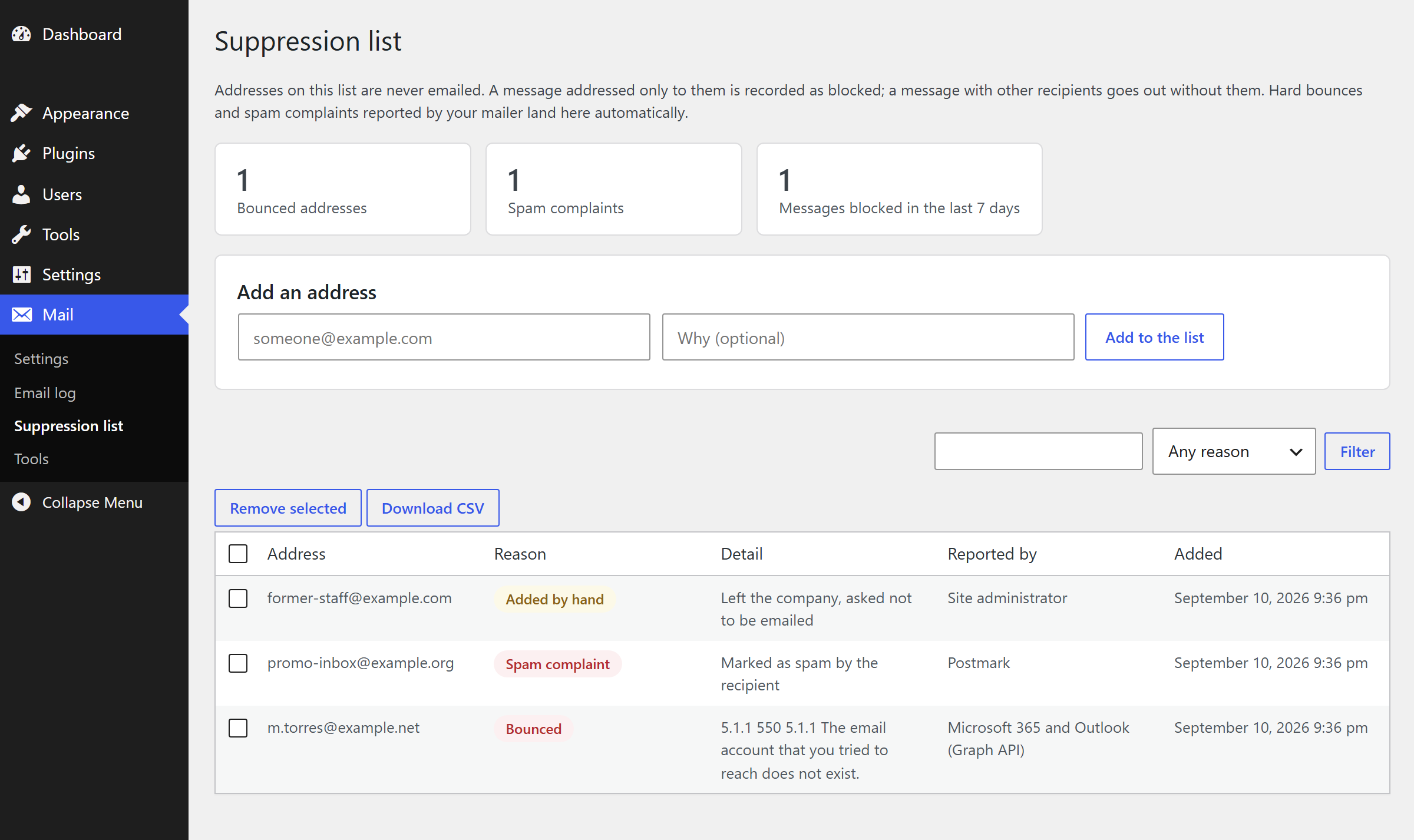
Most mail plugins stop at "accepted by the server". This one closes the loop. For Microsoft and Google it reads the delivery reports that come back to the connected mailbox and parses the machine readable part, so a log entry flips from Delivered to Bounced with the real reason, such as 5.1.1 the address does not exist. For SendGrid, Mailgun, Brevo, Postmark and Resend it takes their delivery, bounce and complaint webhooks. Hard bounces and spam complaints go on a suppression list, and the plugin refuses to email those addresses again. Repeatedly sending to dead addresses is what gets a domain throttled and blocklisted; this is the part that protects your sending reputation.
Google Workspace and Gmail through the Gmail API with OAuth. Any other SMTP server with STARTTLS or SSL. SendGrid, Mailgun (United States or European region), Brevo, Postmark and Resend over HTTPS, which also gets you around a host that blocks port 587. And the plain PHP mail function, if all you want is the log and the alerts.
Every message is recorded with the mailer that carried it, the plugin or theme that asked for it, and the exact reason for any failure. Failures are queued and retried in the background with the wait doubling each time, a backup mailer can take the finished message the moment the first one fails, and you can be told by dashboard notice, email or webhook. The domain check reads your SPF, DKIM and DMARC records and names what is missing, because that is the usual reason a correctly configured mailer still lands in spam.
The four screens you will actually use.
Passes the WordPress Coding Standards with zero errors and zero warnings, clean against the official Plugin Check, and covered by more than three hundred automated assertions including every mailer driven through a mocked API.
Passwords, API keys and OAuth tokens are encrypted with a key derived from your wp-config salts, never printed back into the settings screen, and can live in wp-config.php instead of the database entirely.
No account with us and no relay of ours. Your site talks straight to the mail provider you chose, with your own credentials, and the plugin sends your data nowhere else.
Use an address at your own domain under Mail, Settings. Free mailbox addresses are rejected or filed as spam by most inboxes.
Pick Microsoft 365, Google, an SMTP server or a sending service. The connection panel for that mailer opens underneath with the fields it needs.
For Microsoft and Google, register an application, paste the id and secret, save and press Connect. For everything else, paste the credentials your provider gave you.
Send a test email from Mail, Tools. If it does not arrive, run the domain check and add whichever of SPF, DKIM and DMARC is missing. Then switch on delivery feedback so bounces come back into the log.
Why it matters. A shop that cannot send an order confirmation looks broken, and a customer who never gets a password reset simply leaves. Authenticated sending plus a log means you find out from your own dashboard, not from a complaint.
Free, and ready to install today.
Free · WordPress 5.8+ · PHP 7.4+ · on the official WordPress.org plugin directory
Get it on WordPress.orgInstall it from your WordPress dashboard under Plugins → Add New by searching for "Demfilz SMTP Mailer", or upload the zip, activate, then open Mail → Settings.
Yes, that is the reason it exists. It signs in with OAuth and posts each message to the Microsoft Graph API, so it keeps working after basic authentication and SMTP AUTH are switched off. There is also an SMTP mailer that uses the same modern authentication if you would rather keep the SMTP path.
Signing in suits a single mailbox: register an application, press Connect, sign in once. Application permissions need an administrator to consent once, never expire until the client secret does, and can send from any mailbox in the tenant, so pair them with an application access policy that limits the site to the one mailbox you intend.
Yes. The Microsoft, Google, SendGrid, Mailgun, Brevo, Postmark and Resend mailers all send over HTTPS, so a blocked port 587 or 465 does not stop them.
Encrypted in the database with a key derived from the salts in your wp-config.php file, so a stolen database dump alone does not hand them over. They are never printed back into the settings screen. You can also define any setting as a constant in wp-config.php, in which case nothing is stored in the database at all.
Two ways. The sending services (SendGrid, Mailgun, Brevo, Postmark, Resend) post delivery events to a webhook address the plugin gives you, protected by a long secret. Microsoft and Google do not post events, so if you allow it the plugin reads the delivery reports that arrive in the connected mailbox every fifteen minutes and parses the standard delivery status part inside them. Either way the matching log entry is marked Bounced with the reason, and the address goes on the suppression list.
The permission it asks for allows reading the mailbox, which is why it is off by default and a separate switch. The plugin only lists recent messages from postmaster or mailer-daemon addresses or with an Undeliverable style subject, fetches only those, and stores only the failed address and the reason. With Microsoft application permissions you can additionally scope the application to one mailbox with an application access policy.
It is written to the log with the exact reason, queued, and tried again in the background with the wait doubling each time. If you have set a backup mailer, the finished message is handed straight to it instead. A notice appears in the dashboard either way, and you can also have an email or a webhook alert.
Only if you ask it to. Message bodies are off by default, because password reset links and customer details would otherwise sit in your database. Entries older than the retention period, thirty days out of the box, are deleted automatically.
Only one plugin should own sending. This one steps aside if it sees that another mail plugin has already taken over the mailer object, and shows a warning so you know to deactivate one of them.
Yes - it is published on the official WordPress.org plugin directory: install it from your WordPress dashboard under Plugins → Add New by searching for "Demfilz SMTP Mailer". A direct download is also available from this page.
Transactional templates, delivery reporting, a mail queue that survives a busy sale - this is the kind of thing we build. Tell us what your site needs and we will come back with a plan and a fixed quote.