WooCommerce plugin · Trade accounts · Pay on account · Free

Demfilz Trade Accounts for WooCommerce

Let approved trade customers pay on account. They see a "Pay on account" option at checkout, the order ships as usual, and it is recorded on their account with payment terms, a due date and their purchase order number. You see what every account owes and what is overdue, and you record each payment when the money arrives. Works in the classic checkout and the checkout block.

v1.0.0 · WordPress 6.2+ · WooCommerce 8.3+ · PHP 7.4+ · free · submitted to WordPress.org, review in progress

Only approved customers ever see Pay on account Terms, due date and purchase order number on every order Balances, overdue invoices and one click payment recording

Pay on account, for approved customers only

Wholesale and trade stores sell to approved business customers on credit: the goods ship now and the invoice is paid within 7, 14 or 30 days, usually by bank transfer. WooCommerce has no option for that, and its cheque and bank transfer methods put the order on hold and are open to every shopper. This plugin adds a Pay on account payment method that appears only for logged in customers whose trade account is approved, or whose role is on your auto approved list. The check runs again when the order is placed, so nobody else can use it, including through the Store API.

Terms and a purchase order on every order

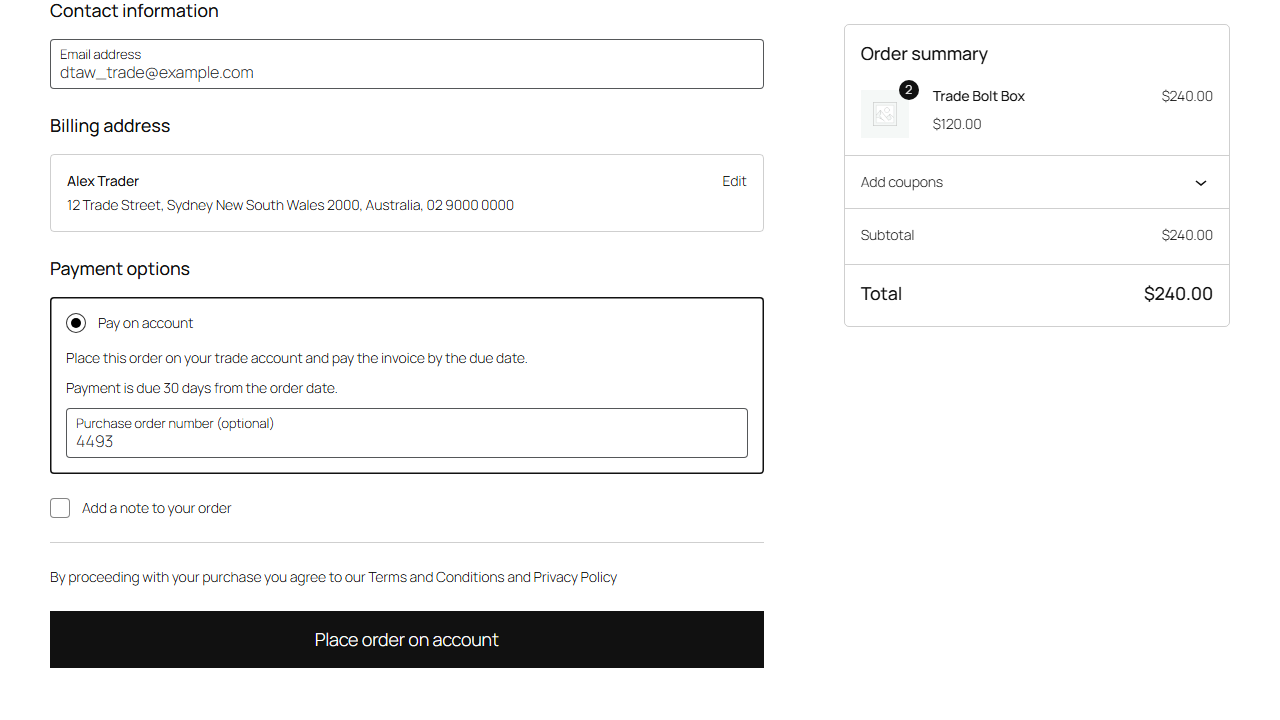
The checkout box tells the customer their terms ("Payment is due 30 days from the order date") and asks for a purchase order number: optional, required, or not at all. The order goes to Processing so it ships straight away (or On hold or Completed if you prefer), records the due date, the terms and the PO number, and is not marked as paid until you record the payment. The thank you page, the order emails and My Account say when payment is due and how to pay, using the bank details you write in the settings.

Applications and approvals

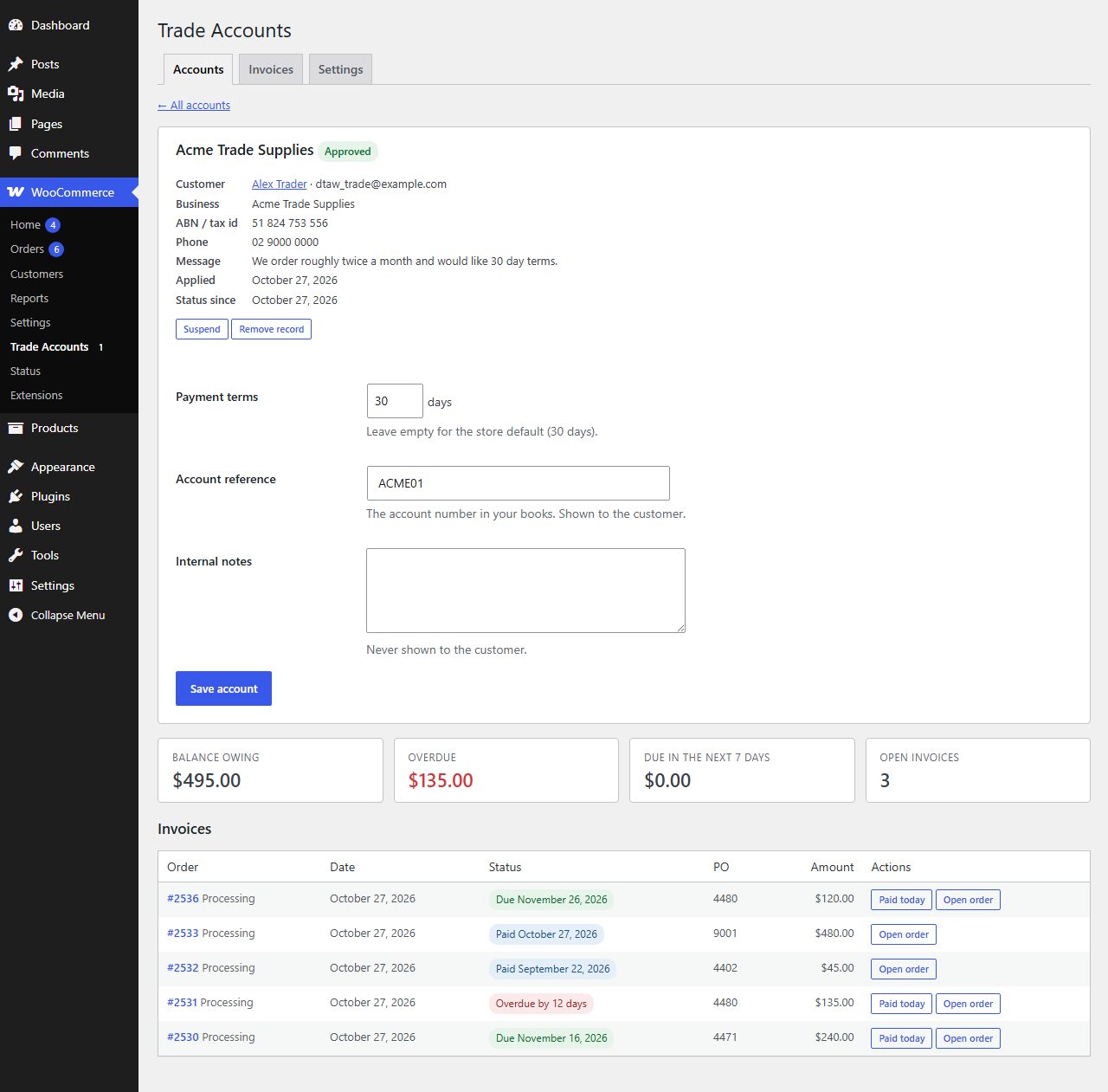
Customers apply from My Account → Trade account with their business name, ABN or tax id, phone and a message, or from any page with the [dtaw_apply] shortcode. You are emailed, and the customer is emailed when you decide. Approve, decline, suspend or reinstate accounts from WooCommerce → Trade Accounts, from the customer's user profile, or from the link in the application email. Give each account its own terms and an account reference (their account number in your books), keep internal notes, and add a customer yourself without an application.

Every order on account is an invoice

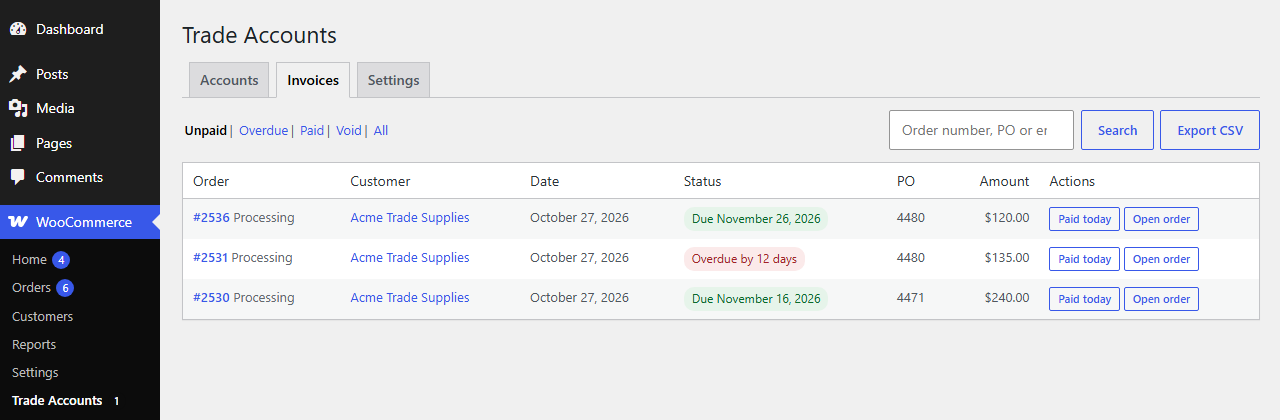
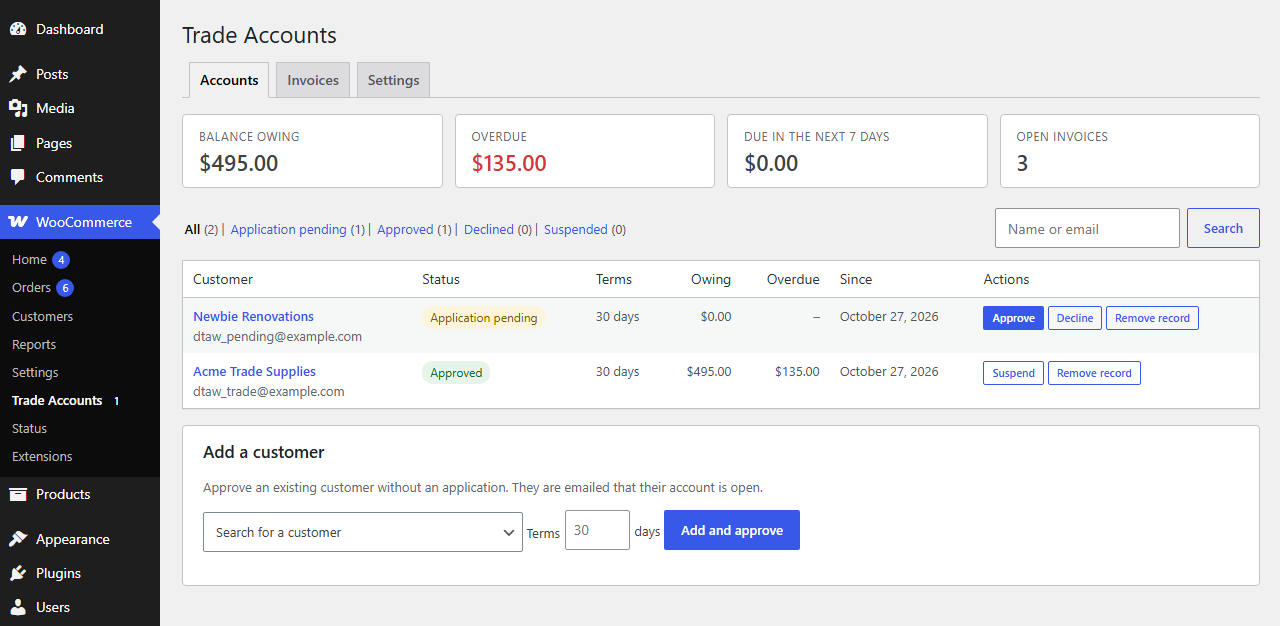
The Invoices tab lists unpaid, overdue, paid and void invoices, searchable by order number, purchase order number or email, with a CSV export. Four tiles show the balance owing, the overdue amount, what is due in the next 7 days and the open invoice count, for the whole store and for each account. Cancelled, refunded or failed orders drop off the balance on their own, and partial refunds reduce the amount owing. The orders list gets an On account column: due date, days overdue, paid, with the PO number.

Record payments as the money arrives

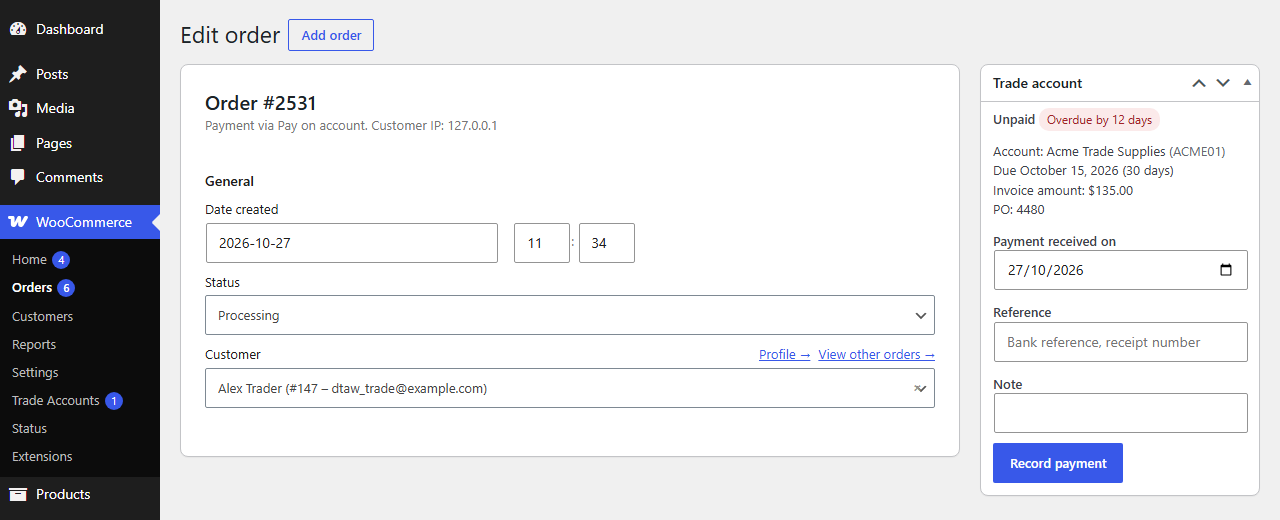
Open the order and use the Trade account box to enter the date, the bank reference and a note, or click Paid today on the Invoices tab. The order gets its paid date and a note, the customer sees it under Recently paid, and Mark as unpaid reverses a mistake. Optionally mark Processing orders as Completed when they are paid.
Built to be trusted with money

Passes the WordPress Coding Standards with zero errors and zero warnings and is clean against the official Plugin Check. An automated suite of 160 checks covers who can use the gateway, order placement from both checkouts, state changes on cancel and refund, balance sums, payment recording and the emails.

Nothing leaves your site

No external services, no tracking, no account. Account statuses live on the customer, invoice details live on the orders as financial records, and every admin action is checked for permission and signed with a nonce.

Light on the page

One small script loads on the checkout block page and one on the plugin's own admin screens. The classic checkout works without any JavaScript, and shop and catalogue pages are untouched.

How it works

Trade accounts in five minutes

1

Install and activate

Upload the zip under Plugins, Add New Plugin, Upload Plugin, and activate it. WooCommerce must be active.

2

Write your payment instructions

Under WooCommerce → Trade Accounts → Settings set the default terms, the status for orders on account, the purchase order field and your bank details.

3

Approve a customer

Add and approve a customer from the Accounts tab, or wait for applications from My Account → Trade account.

4

Record payments

When the bank transfer arrives, record it on the order or click Paid today on the Invoices tab.

Read the full setup guide →
Demfilz Trade Accounts: an invoice with a 30 days badge

Why it matters. Trade customers expect to order now and pay the invoice later. Without it they ring to order or you take card details over the phone. With it they check out themselves at any hour, the goods ship straight away, and your bookkeeper sees exactly what each account owes and when it is due.

See it

From application to paid invoice

Eight screens from the plugin, captured on a standard WordPress site with a sample trade store.

WooCommerce Trade Accounts screen: balance owing, overdue, due in the next 7 days and open invoice tiles, an account list with a pending application and an approved account, and an Add a customer box
Balances, the account list and the approve, decline and suspend actions.
One trade account: the application details, payment terms, account reference and internal notes, its balance tiles and its invoices
An account: application, terms, reference and its invoices.
The checkout block with Pay on account selected, the terms, a purchase order number field and a Place order on account button next to the order summary
Pay on account in the checkout block, with the purchase order field.
The Invoices tab: unpaid invoices with due dates, an overdue badge, purchase order numbers, amounts and Paid today buttons
The Invoices tab with due dates and one click payment recording.
The Trade account box on an order: unpaid, overdue by 12 days, the account, due date, invoice amount and PO, and the record payment form with date, reference and note
The Trade account box on an order.
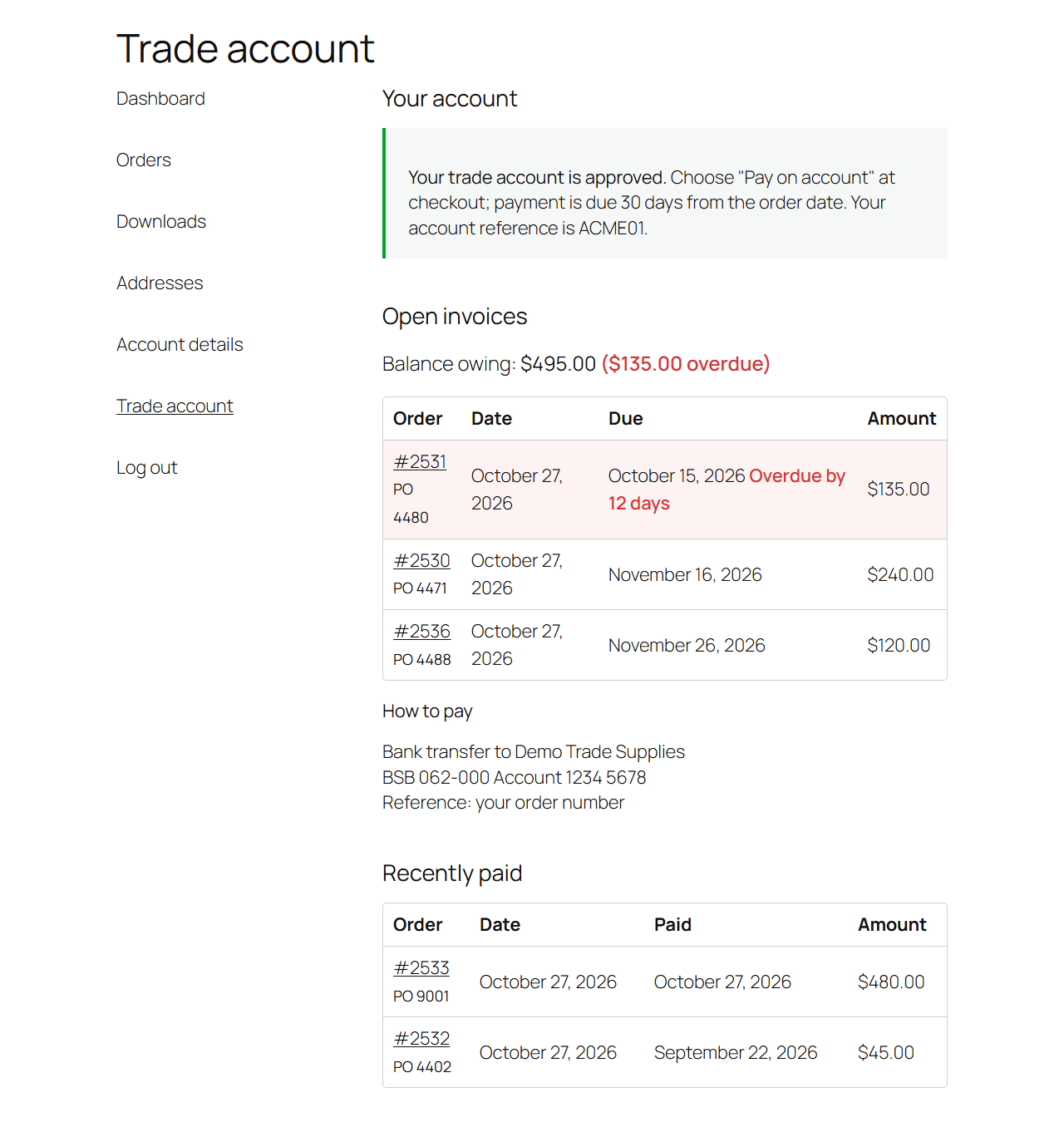
My Account Trade account tab: the approved status, balance owing, open invoices with due dates and an overdue flag, how to pay, and recently paid invoices
My Account: open invoices and how to pay.
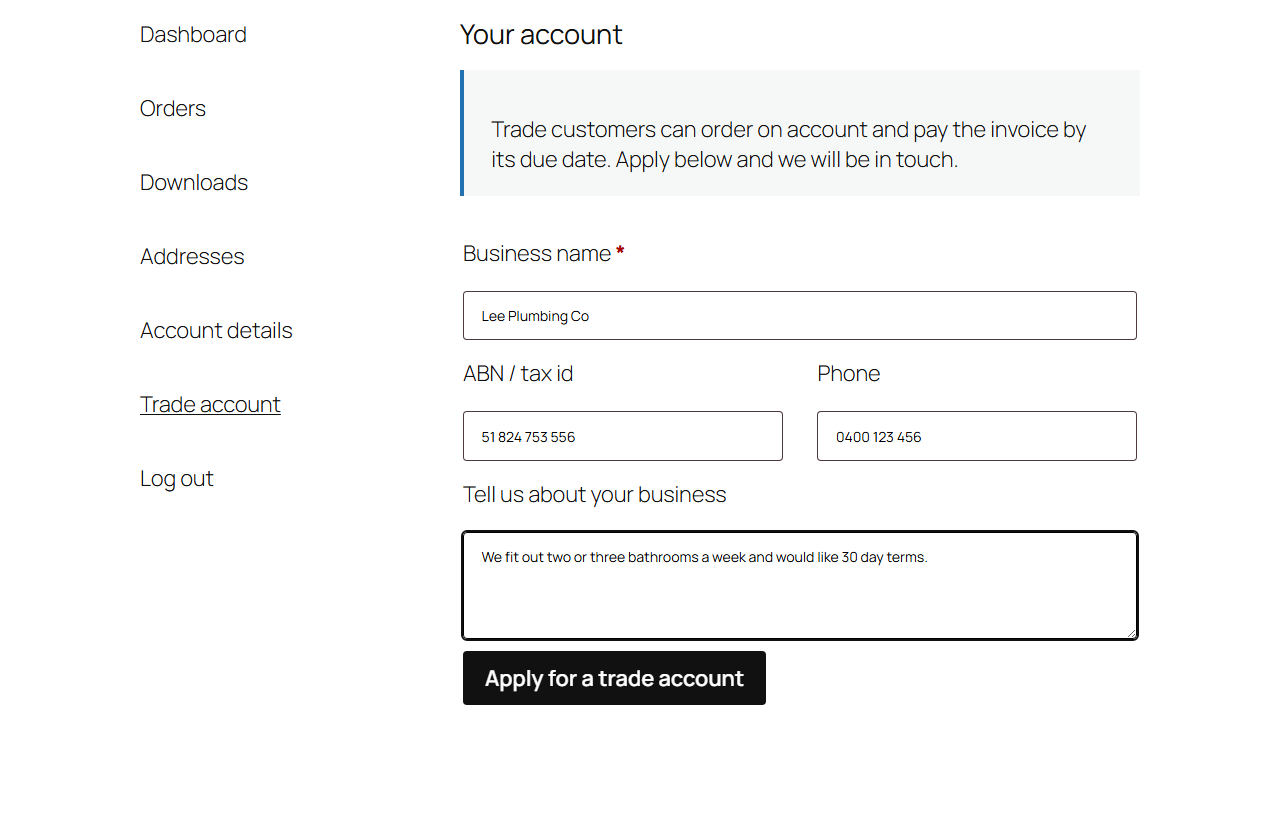
The trade account application form in My Account: business name, ABN or tax id, phone and a message
The application form.
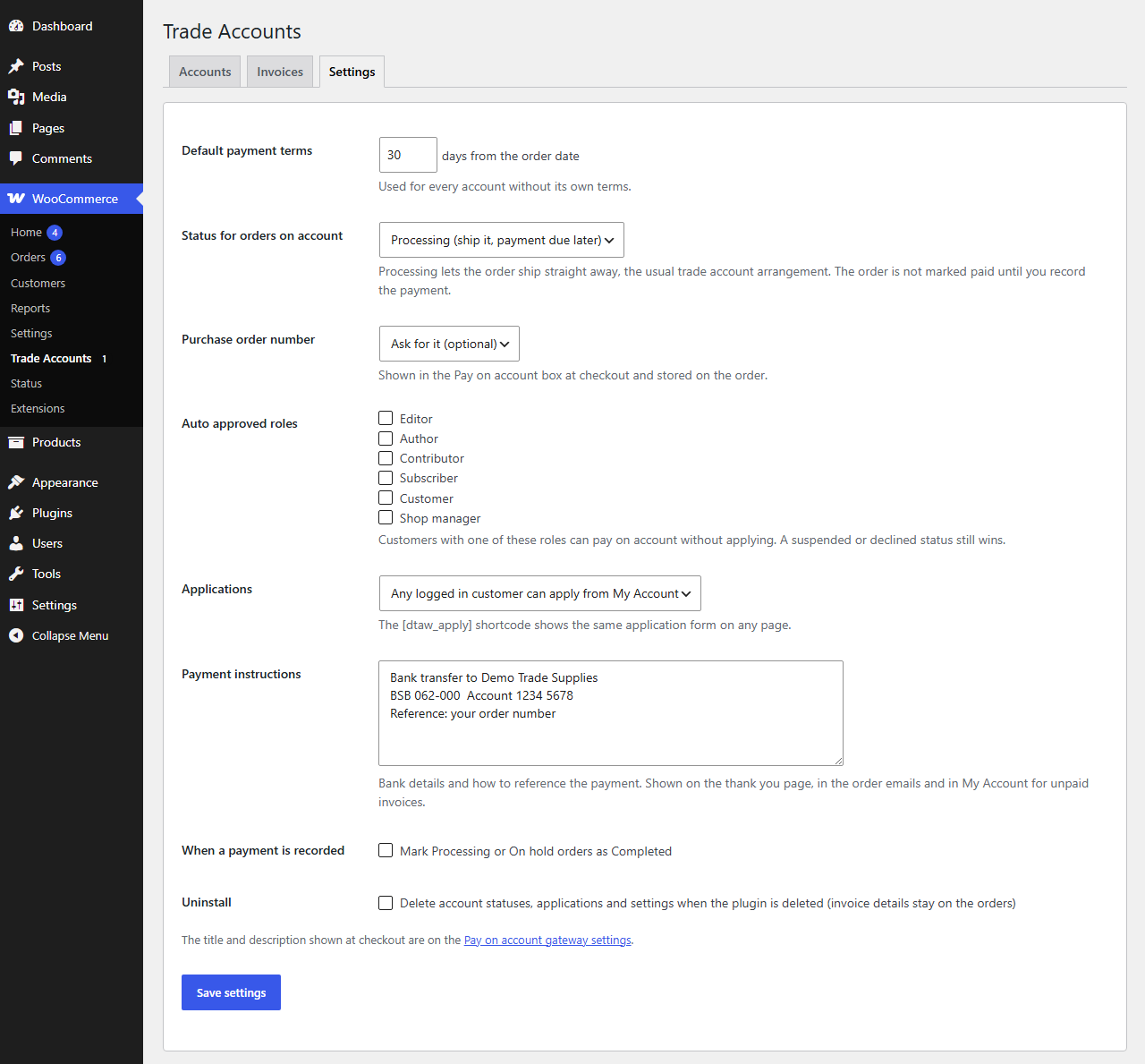
The settings: default payment terms, status for orders on account, purchase order number, auto approved roles, applications, payment instructions, completion and uninstall options
Settings.
Download

Get Demfilz Trade Accounts

Free, and ready to install today.

Demfilz Trade Accounts for WooCommerce v1.0.0

Free · WordPress 6.2+ · WooCommerce 8.3+ · PHP 7.4+ · submitted to WordPress.org, review in progress

Download free (.zip)

Setup guide →

Upload the zip under Plugins → Add New Plugin → Upload Plugin, activate, then approve your first customer under WooCommerce → Trade Accounts. No account required, no external services, HPOS compatible.

FAQs

Common questions

Who sees Pay on account at checkout?

Only logged in customers whose trade account is approved, or whose role is on your auto approved list. Suspended or declined accounts never see it, and guests never do. The check runs again when the order is placed, so it cannot be bypassed by editing the checkout page or calling the Store API.

What happens to the order?

It is created like any other order and moved to the status you chose, Processing by default, so it ships straight away. The order records the due date, the terms and the purchase order number. Its paid date stays empty until you record the payment, so reports and accounting syncs do not treat it as paid.

How do I record a payment?

Open the order and use the Trade account box to enter the date, a bank reference and a note, or click Paid today on the Invoices tab. The order gets its paid date and a note, and the customer sees the invoice under Recently paid. Mark as unpaid reverses a mistake.

Can a customer pay an open invoice by card?

Not through this plugin. The order was accepted on account, so it is not pending payment. Customers pay by bank transfer following the payment instructions you write in the settings, and you record the payment. Partial payments are not tracked; record the payment when the invoice is paid in full.

Does it work with the checkout block?

Yes. The terms, the purchase order field and the Place order on account button appear in the checkout block, and the classic shortcode checkout is supported too, with no JavaScript needed on the classic page. High-Performance Order Storage is supported.

Can I give different customers different terms?

Yes. Each account can have its own terms in days and its own account reference, the account number in your books. Accounts without their own terms use the store default, 30 days unless you change it.

Is there a Pro version?

Yes. A Pro add-on adds credit limits with checkout blocking, overdue reminder emails, account statements with aged balances, statement emails and accounting sync hooks for Demfilz Sync for Xero, QuickBooks and MYOB. Everything on this page works without it. Ask us about Pro through the contact form.

Is it on WordPress.org, and where do I get it?

It has been submitted to the official WordPress.org plugin directory and the review is in progress. Until it is published there, download the plugin zip from this page and upload it under Plugins, Add New Plugin, Upload Plugin.

Need something more for your store?

Credit limits, statements, wholesale pricing, custom checkout rules - this is the kind of thing we build. Tell us how your store sells and we will come back with a plan and a fixed quote.