WooCommerce plugin · Returns · Warranty claims · Refunds · Free

Demfilz Returns and Warranty Claims for WooCommerce

Returns usually arrive by email: no record of which items, photos scattered across inboxes, no status for the customer, and a refund keyed in by hand. This plugin gives every return and warranty claim a number, a page and a history. Customers lodge it from their account with photos, you talk it through in one message thread, and it ends in a proper WooCommerce refund or a replacement order.

v1.0.0 · WordPress 6.3+ · WooCommerce 8.0+ · PHP 7.4+ · free · not on WordPress.org yet

Claims from My Account, or by email link for guests Photos and messages kept with each claim One click to refund the items or send a replacement

A claim form customers can actually use

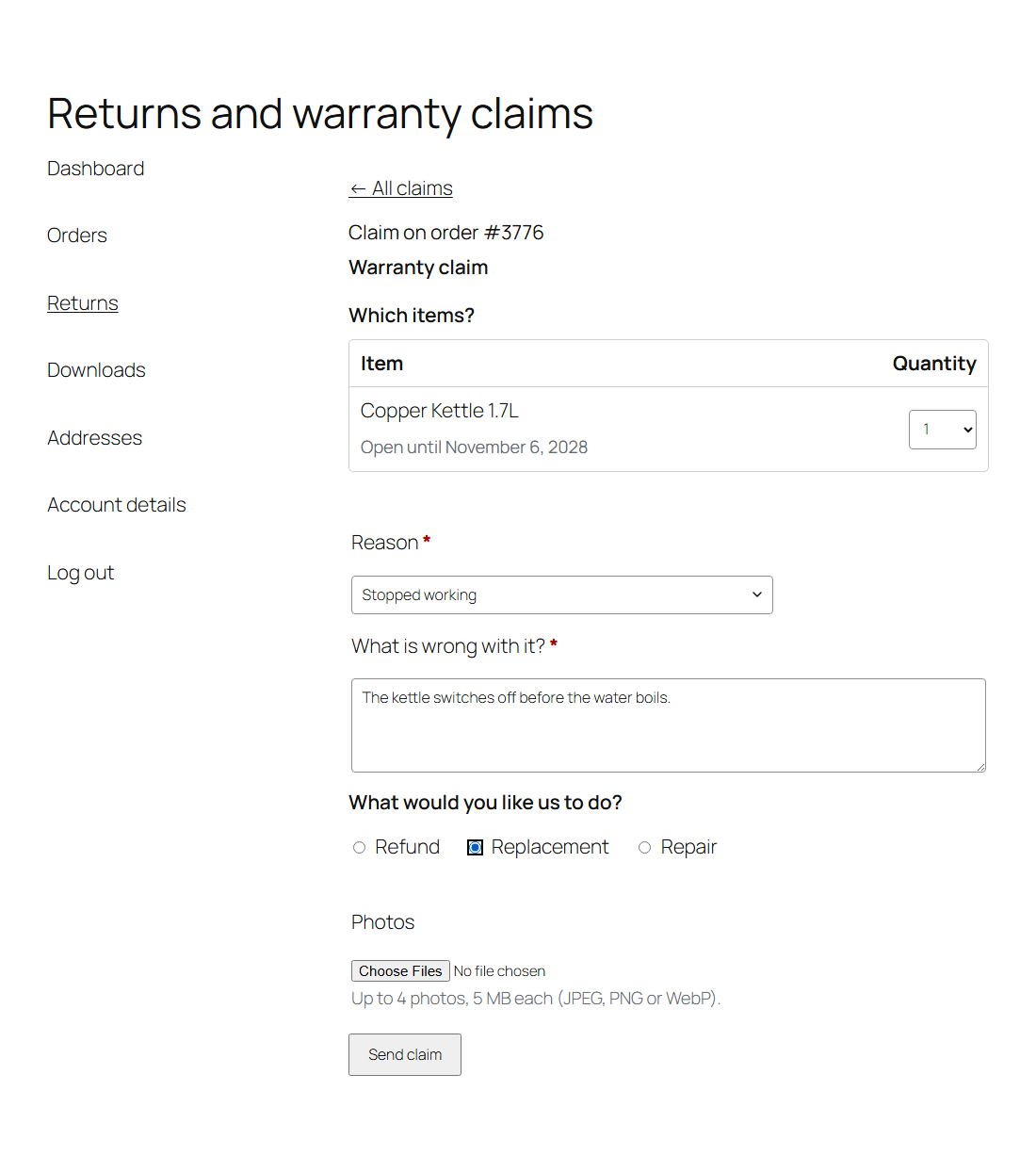
Every eligible order gets a Request a return or warranty claim button, and My Account gets a Returns tab with the customer's claims and the orders they can still claim on. The customer chooses a return or a warranty claim, then which items and how many, a reason from your own list, what is wrong, what they would like you to do (refund, replacement or repair) and up to four photos. Items outside their period, already refunded or in another claim are shown but cannot be picked, with the date the period ended.

Customers without an account too

The plugin adds a Returns and warranty page. A guest types the order number and the email address used at checkout. If they match an order that can be claimed, a link that works for 48 hours goes to the address on the order, and the page shows the same neutral message either way, so it cannot be used to fish for orders. After that, every claim page and photo link carries its own token.

One place to work each claim

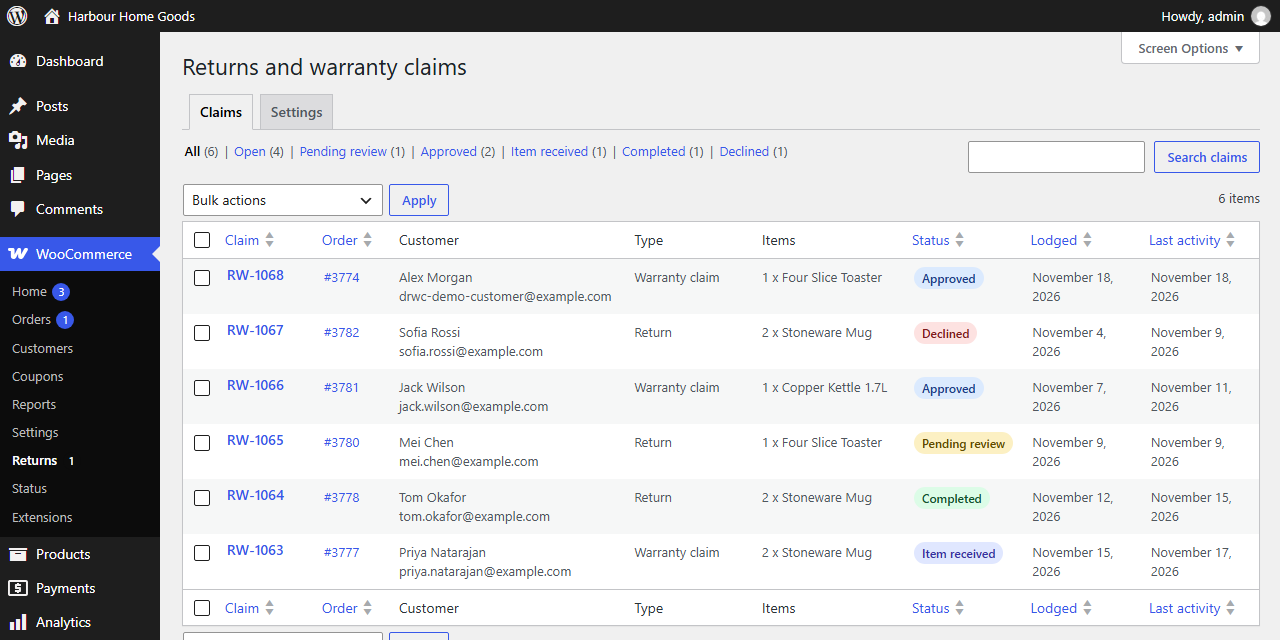
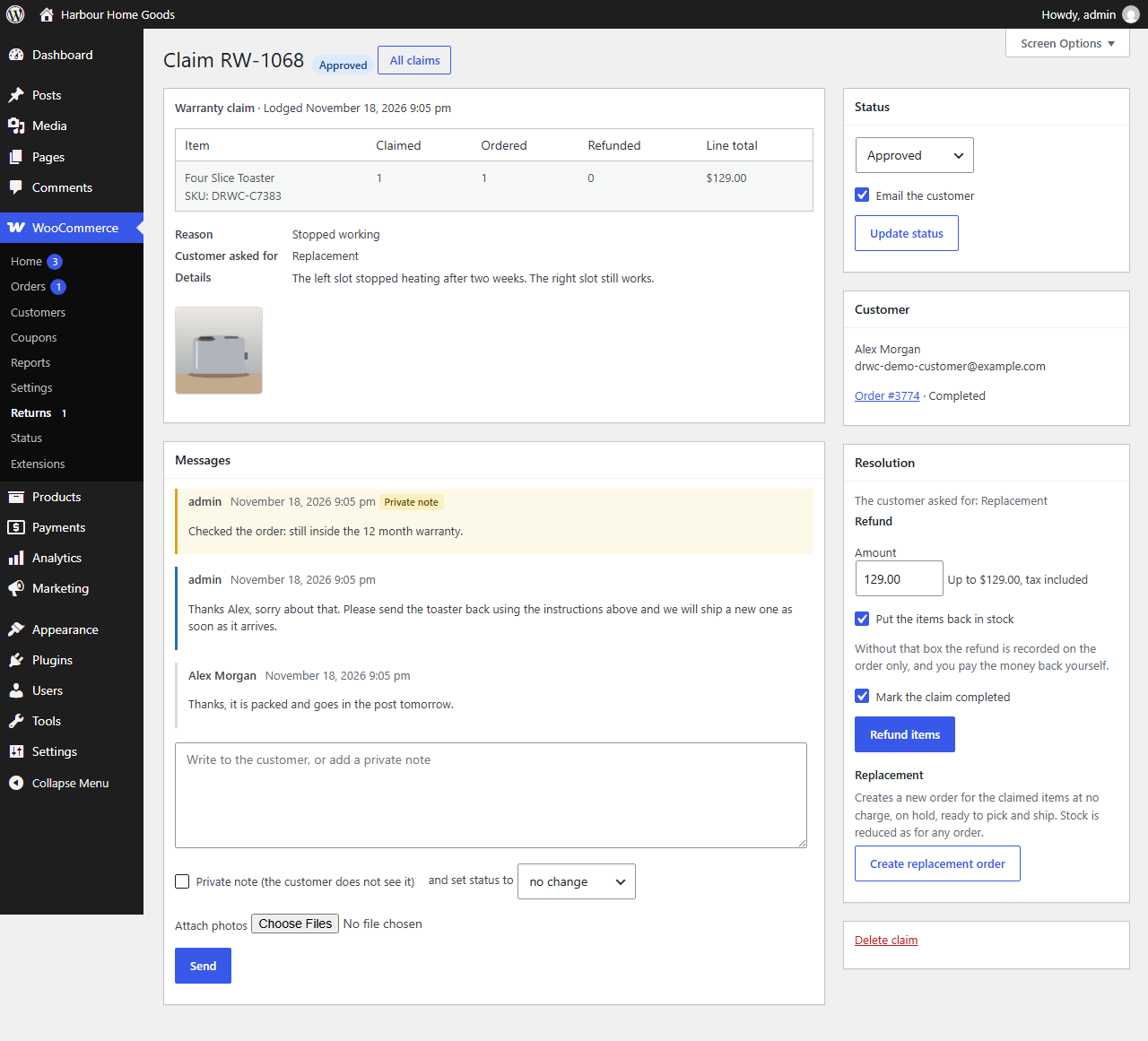
WooCommerce → Returns lists every claim with status filters, search by claim number, order, name or email, and bulk status changes, and the menu shows how many are waiting. A claim shows the items against the order (ordered, refunded, line total), the reason and details, the photos and the whole conversation. Reply to the customer or add a private note and change the status in the same step; the customer gets one email, not two. Phone and email claims can be logged from the order screen.

Refunds and replacements that add up

Refund items creates a WooCommerce refund for exactly the claimed lines, tax included, capped at what is still refundable on each line. Lower the amount for a restocking fee and it is spread across the lines; tick to put the items back in stock; tick to refund through the payment gateway when it supports refunds. A second click cannot refund twice. Create replacement order makes a no-charge order on hold, with the same addresses, ready to pick and ship, linked back to the claim.

Your rules

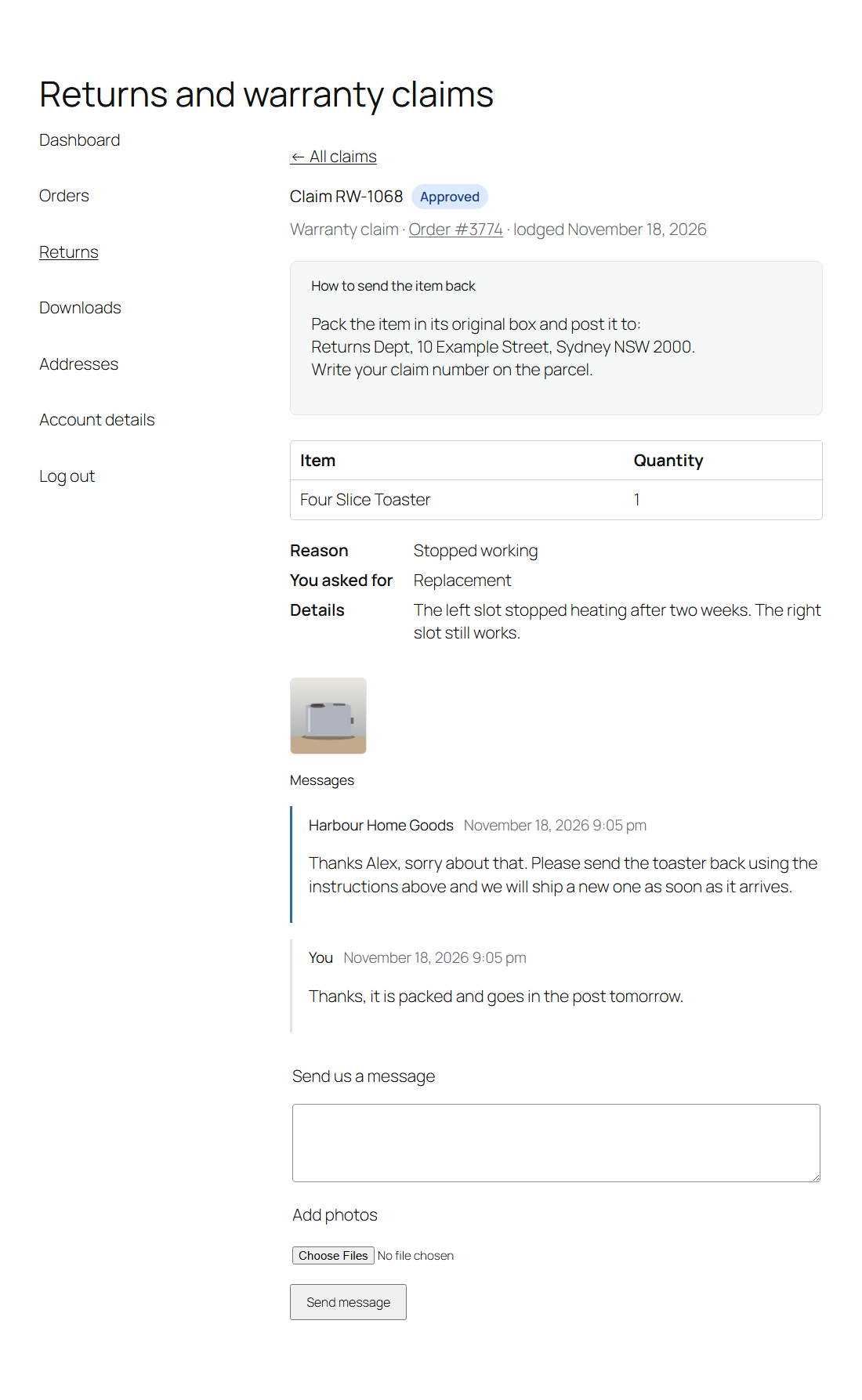
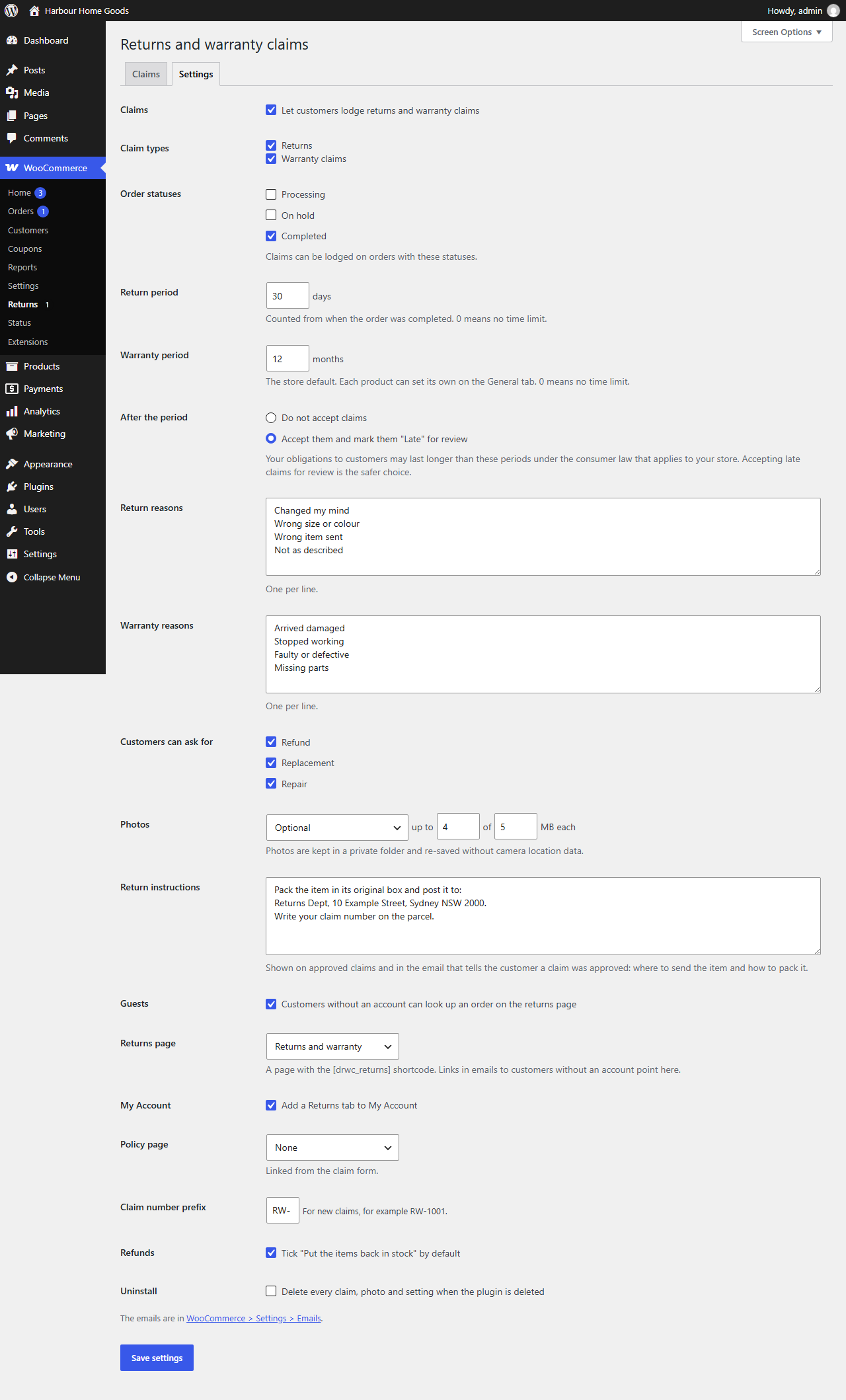
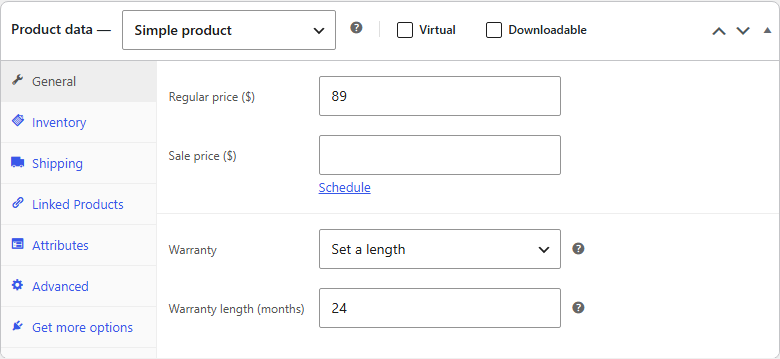
Choose which order statuses can be claimed, the return period in days and the warranty period in months, with a warranty setting on every product (store default, a set length, no time limit or no warranty claims). After a period ends, refuse the claim or accept it marked Late for review. Write your own reasons, choose the resolutions customers can ask for, make photos optional or required, and add the return instructions shown once a claim is approved.

Tested where the money is

Passes the WordPress Coding Standards with zero errors and zero warnings and is clean against the official Plugin Check. 180 automated checks cover eligibility, quantities, refunds with tax, earlier partial refunds, double clicks, replacements, photos and privacy, in both order storage modes, on Windows and on Linux. 60 browser checks cover the customer, guest and admin screens.

Nothing leaves your site

No external services, no tracking, no account. Claims and photos stay in your own database and uploads folder, every admin action is checked for permission and signed with a nonce, and public forms are rate limited.

Light on the page

One small stylesheet on the account and returns pages, and no front-end JavaScript at all. The forms work in any theme, block or classic.

How it works

Ready for your first return in five minutes

1

Install and activate

Upload the zip under Plugins, Add New Plugin, Upload Plugin, and activate it. WooCommerce must be active. A Returns and warranty page is created for you.

2

Set your rules

Under WooCommerce → Returns → Settings, set the periods, reasons, photo rules and your return instructions.

3

Link the returns page

Add the Returns and warranty page to your footer or menu so customers without an account can find it.

4

Work the claims

New claims appear in WooCommerce → Returns. Reply, approve, then refund the items or create a replacement order.

Read the full setup guide →
Demfilz Returns and Warranty Claims: a parcel with a return arrow and a green shield with a tick

Why it matters. How a store handles a faulty item decides whether that customer buys again. A clear claim page with a status and a reply beats a week of email back and forth, and a refund that matches the claimed lines keeps your stock and your books right.

See it

From "it stopped working" to sorted

Six screens from the plugin, captured on a standard WordPress site with a sample store.

A warranty claim in WooCommerce Returns: the toaster against the order, the reason, details and a photo, a message thread with a private note, and Status, Customer and Resolution boxes with Refund items and Create replacement order
A claim in WooCommerce → Returns.
The claims list: claim numbers, orders, customers, type, items, coloured status badges and dates, with status filters and search
The claims list.
The warranty claim form in My Account: the item and quantity, the reason, what is wrong, refund, replacement or repair, and photos
The claim form in My Account.
A claim page in My Account: Approved badge, how to send the item back, the item, reason and photo, and the message thread with a reply box
A claim page in My Account.
The settings: claim types, order statuses, return and warranty periods, late claims, reasons, resolutions, photos, return instructions, guests, returns page, My Account and more
Settings.
The product editor General tab with a Warranty setting of Set a length and 24 months
A warranty length on a product.
Download

Get Demfilz Returns and Warranty Claims

Free, and ready to install today.

Demfilz Returns and Warranty Claims for WooCommerce v1.0.0

Free · WordPress 6.3+ · WooCommerce 8.0+ · PHP 7.4+ · not on WordPress.org yet

Download free (.zip)

Setup guide →

Upload the zip under Plugins → Add New Plugin → Upload Plugin, activate, then open WooCommerce → Returns → Settings. No account required, no external services, HPOS compatible.

FAQs

Common questions

How much of an item can a customer claim?

What they ordered, less what has already been refunded, less what is in their other open claims. A claim that was refunded here no longer counts, because the refund itself lowers the line.

Does the refund send the money back?

Only when you tick the box to refund through the payment method, and only for payment gateways that support refunds. Otherwise the refund is recorded on the order and you pay the money back yourself, the same as a manual refund in WooCommerce.

Can I charge a restocking fee?

Yes. Lower the refund amount before you refund. It is spread across the claimed lines in proportion, so WooCommerce's records for each line stay right.

Can customers without an account make a claim?

Yes, when Guests is on. They enter their order number and email address on the Returns and warranty page. If they match an order that can be claimed, a link that works for 48 hours is emailed to the address on the order. The page always shows the same message, so it cannot be used to find out whether an order exists.

What happens after the return or warranty period?

You choose: refuse the claim, or accept it and mark it Late for review. Your obligations under the consumer law that applies to your store may last longer than the periods you set, so accepting late claims for review is the safer choice. Staff can always log a claim from the order screen.

Who can see the photos?

Store staff and the customer who owns the claim. Photos are kept in a private folder under random names, served only after that check, and re-saved through WordPress's image editor so the location and device details cameras add are dropped.

What does a replacement order look like?

A normal WooCommerce order for the claimed items at no charge, on hold and ready to pick and ship, with the same addresses and a link back to the claim. Stock is reduced like any order, and the customer is told about it through the claim rather than a separate order email.

Is any data sent anywhere?

No. Claims, messages and photos stay on your own site, and the only thing sent is the emails your store sends. The WordPress privacy tools export and erase claims by email address.

Is it on WordPress.org, and where do I get it?

It is not on the WordPress.org plugin directory yet. Download the plugin zip from this page and upload it under Plugins, Add New Plugin, Upload Plugin.

Need something more for your store?

Return shipping labels, store credit refunds, supplier claim-backs, warranty registration - this is the kind of thing we build. Tell us how your store handles returns and we will come back with a plan and a fixed quote.