Australian stores that sell to businesses need the buyer's ABN: for tax invoices, for trade terms, and to know the buyer is a real, active business. A plain text field collects typos, made-up numbers and ABNs that were cancelled years ago. This plugin adds an ABN field to the checkout block and the classic checkout that checks what is typed: the two check digits in every ABN catch a mistyped or invented number straight away, and with a free GUID from the Australian Business Register each ABN is looked up, so you see whether it is active, who it belongs to and whether they are registered for GST.
v1.0.0 · WordPress 6.3+ · WooCommerce 9.9+ · PHP 7.4+ · free · not on WordPress.org yet
Every ABN carries two check digits, so a mistyped or invented number is caught without asking anyone. Out of the box the field is optional, shown to customers with an Australian billing address, and refuses any number whose check digits do not add up. Add a free GUID from the Australian Business Register and each ABN is also looked up: you see whether it is active, who it belongs to and whether they are registered for GST. Until the GUID arrives, the field keeps working with the check digit test.
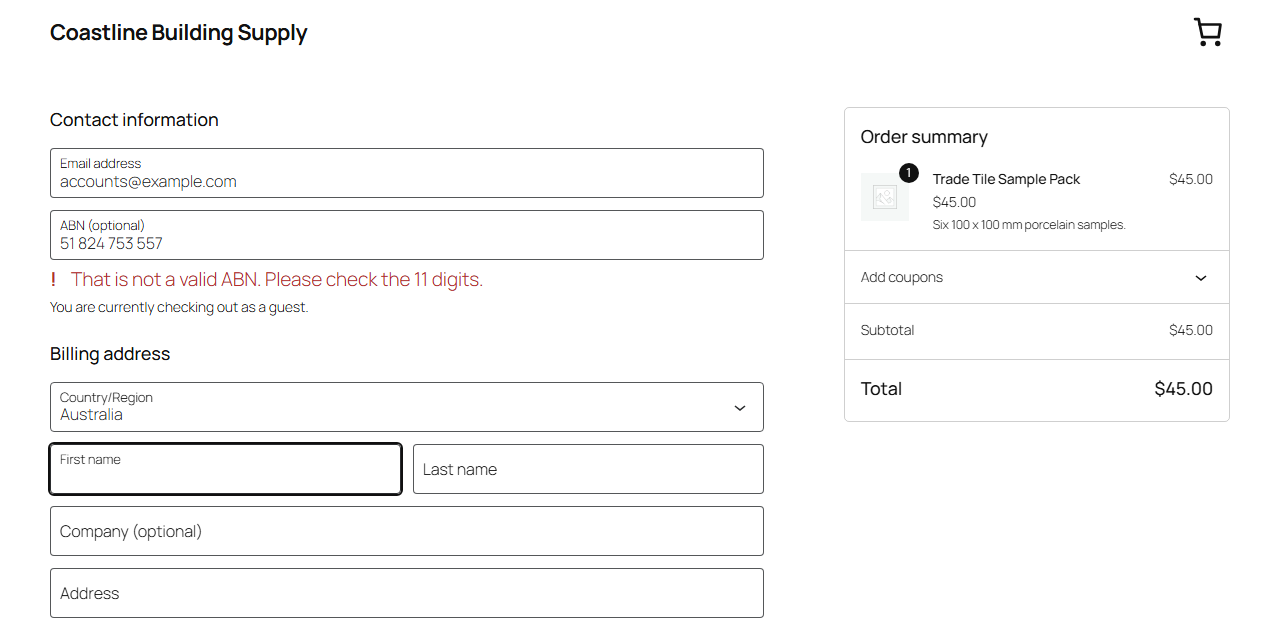
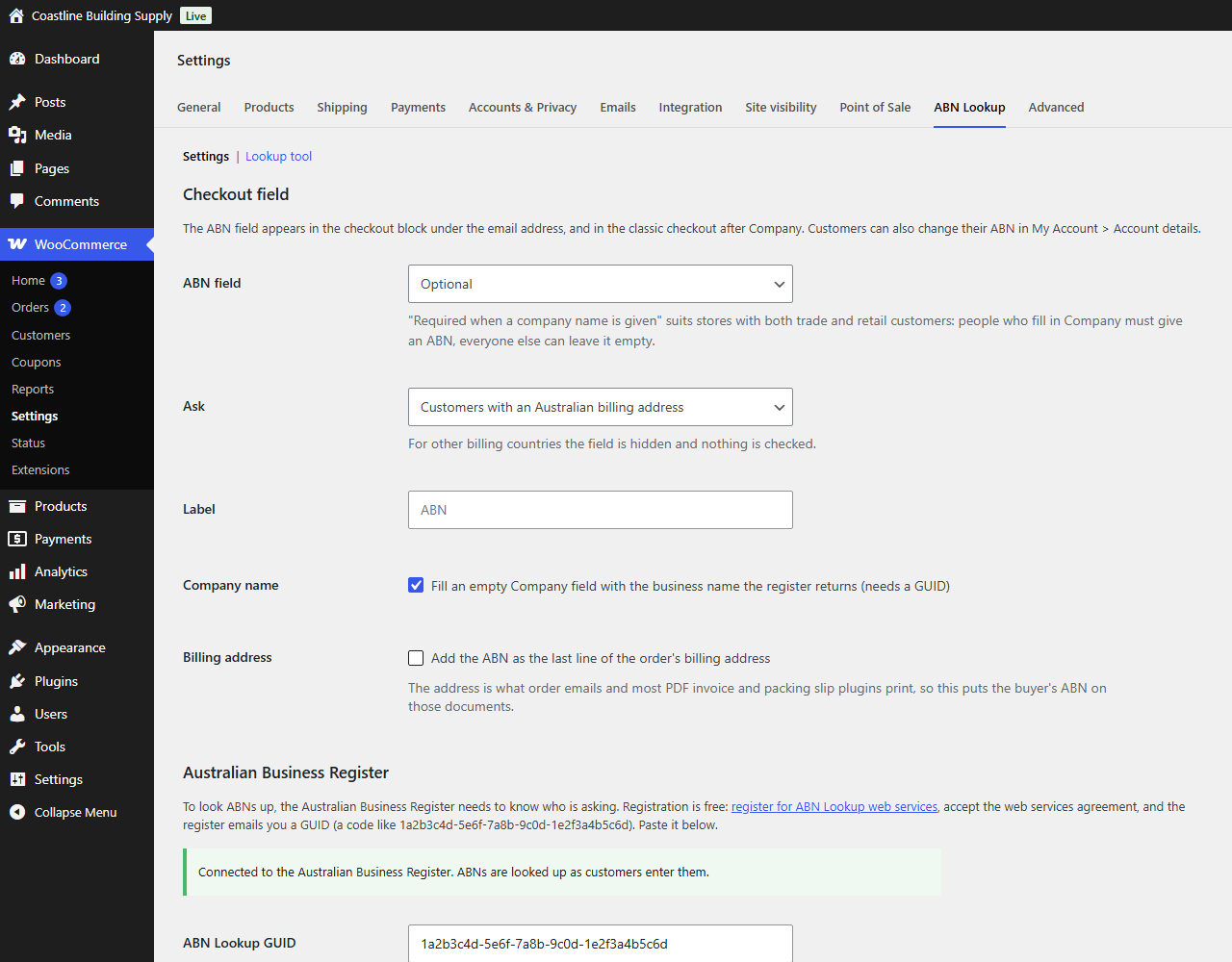
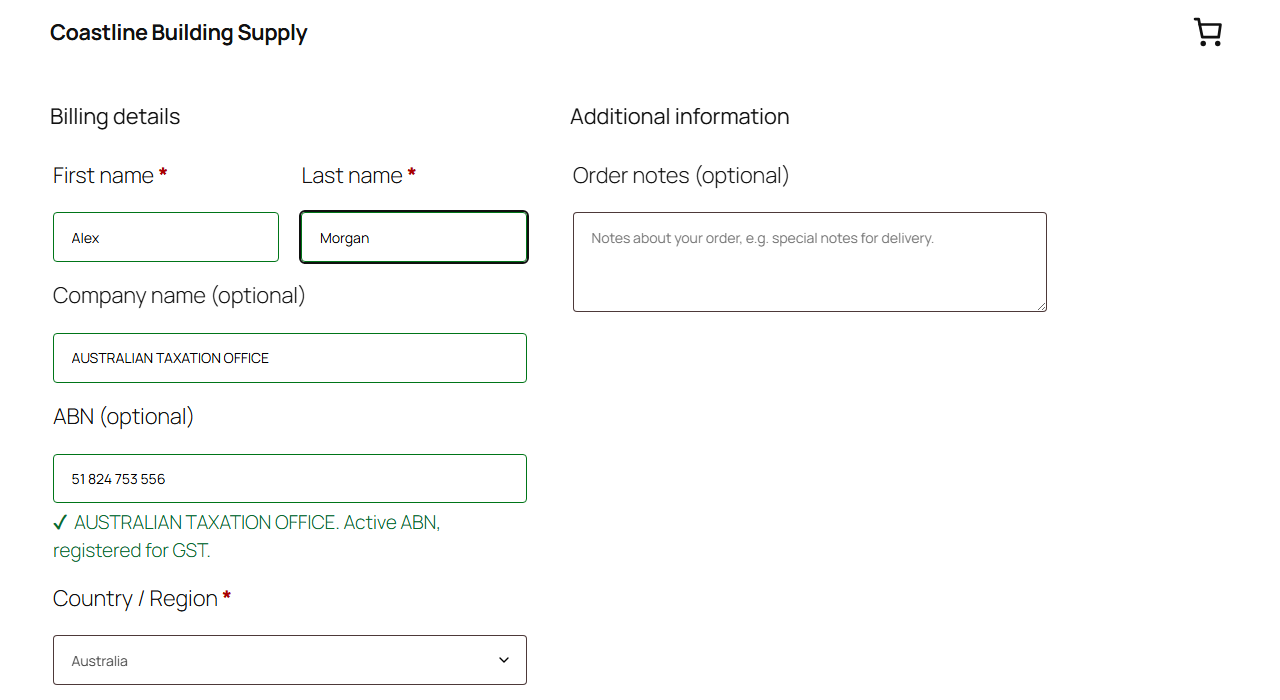
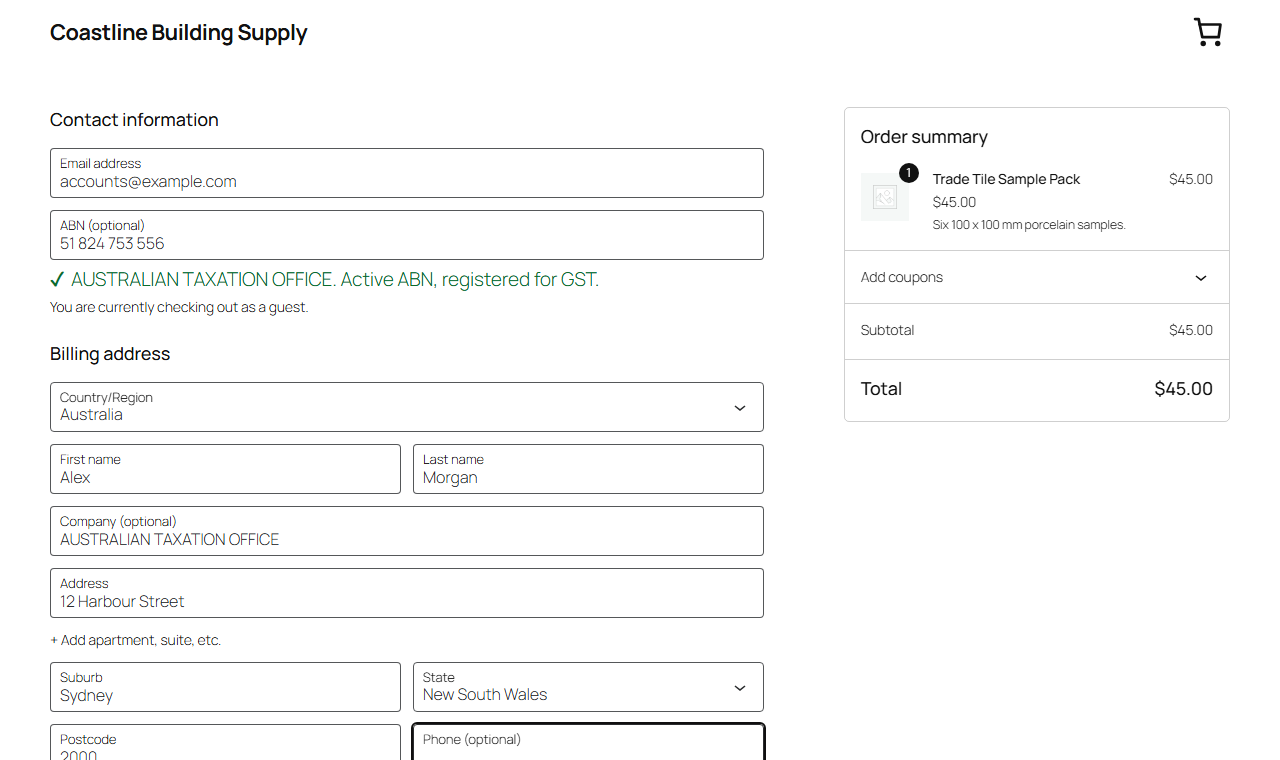
The ABN field sits in the checkout block under the email address, and in the classic checkout after Company. Make it optional, required, required only when a company name is given (for stores with both trade and retail customers), or switch it off. Ask customers with an Australian billing address only, which is the default, or everyone; for other countries the field is hidden and nothing is checked or saved. While the customer types, a line under the field answers: "That is not a valid ABN", or "ACME PTY LTD. Active ABN, registered for GST." The Company field is filled with the business name from the register when it is empty, and a name the customer typed is never replaced. Returning customers get their saved ABN filled in, and can change it in My Account → Account details.
With a GUID saved, choose one of three rules: look the ABN up and refuse ABNs that are cancelled or not on the register; look it up, keep the answer and refuse nothing; or check the format only. Optionally, treat an ABN that is not registered for GST like a cancelled one. The ABN is checked again on your server when the order is placed, whatever the browser sent. And if the register cannot be reached, the order always goes through and is marked "not checked": a register outage never costs you a sale.
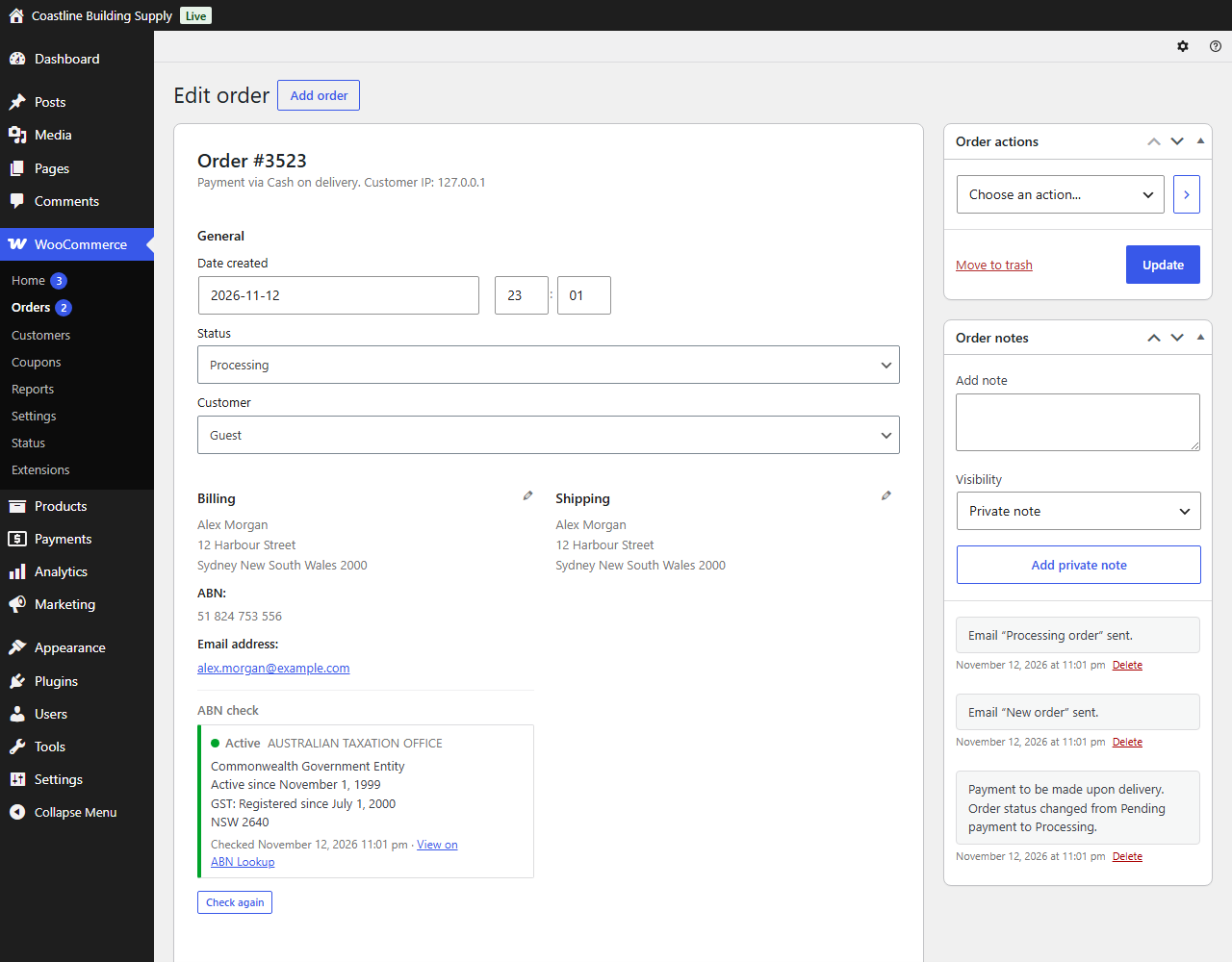
The ABN is stored as 11 digits on the order and on the customer account. The order screen shows an ABN check panel: status, entity name, entity type, GST registration, state and postcode, when it was checked, a Check again button and a link to the public ABN Lookup record. The admin New order email says what the register answered, and you can find orders by ABN in the order search. Optionally, the ABN is added as the last line of the billing address, which is what order emails and most PDF invoice and packing slip plugins print. The ABN is also included in WooCommerce's personal data export and erasure.
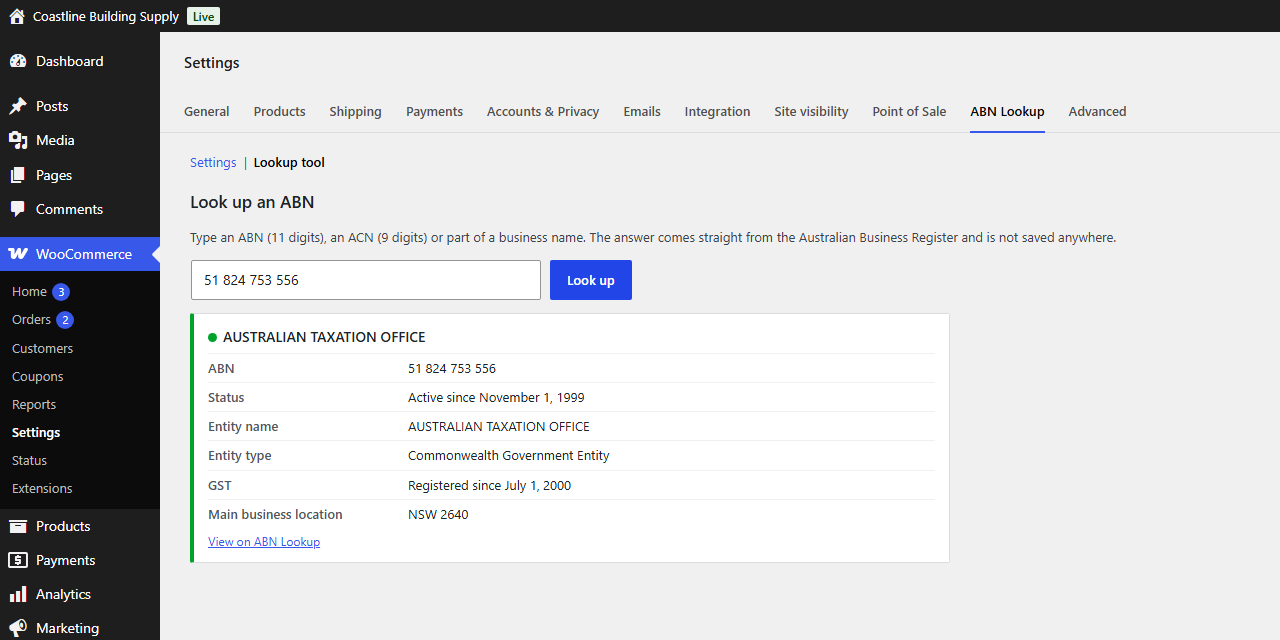
WooCommerce → Settings → ABN Lookup → Lookup tool looks up an ABN, an ACN or a business name without leaving WordPress. And if you use Demfilz Trade Accounts for WooCommerce, the trade account screen shows what the register says about the ABN the applicant gave.
Not affiliated with the Australian Government. This plugin is not affiliated with, endorsed by or supported by the Australian Business Register, the Australian Taxation Office or any other government agency. ABN Lookup data is supplied by the register "as is"; check the public record when a decision depends on it.
Passes the WordPress Coding Standards with zero errors and zero warnings and is clean against the official Plugin Check. An automated suite of 306 checks passes with High-Performance Order Storage on and off, and 117 browser checks pass on a block theme and a classic theme, at phone, tablet and desktop widths.
Customers' browsers ask your store, and your store asks the register. Nothing is sent unless the number passes the check digit test, and what is sent is the ABN, ACN or business name being looked up and your GUID: no customer name, email address, postal address, IP address or order details. Without a GUID the plugin contacts nothing.
Each ABN is asked about once per cache period, 24 hours by default. Live lookups are limited to 20 an hour per IP address and 300 an hour across all visitors, and the check made when an order is placed has an allowance of its own, so using up the live lookups does not switch it off.
Upload the zip under Plugins, Add New Plugin, Upload Plugin, and activate it. WooCommerce 9.9 or newer must be active.
It is live at once: optional, for customers with an Australian billing address, with the check digit test.
Register for ABN Lookup web services, which is free, and the register emails you a GUID. Paste it under WooCommerce → Settings → ABN Lookup and save; the page tells you whether the register accepted it.
Choose what happens when an ABN is entered, and whether the ABN is required.

Why it matters. The buyer's ABN goes on your tax invoices and decides your trade terms. A plain text field collects typos, made-up numbers and ABNs that were cancelled years ago. Here the number is checked while the customer types and again on your server when the order is placed, and what the register answered is kept with the order.
Six screens from the plugin, captured on a standard WordPress site with a sample store. The ABN in the examples, 51 824 753 556, is the Australian Taxation Office's own public ABN.


Free, and ready to install today.
Free · WordPress 6.3+ · WooCommerce 9.9+ · PHP 7.4+ · not on WordPress.org yet
Download free (.zip)Upload the zip under Plugins → Add New Plugin → Upload Plugin, activate, then review WooCommerce → Settings → ABN Lookup. No account is needed to start; a free GUID from the Australian Business Register adds the lookups. HPOS compatible. Not affiliated with or endorsed by the Australian Business Register or the ATO.
No. Without one the plugin still refuses mistyped and made-up numbers, because an ABN contains two check digits. With a GUID it also knows whether the ABN is active, who holds it and whether they are registered for GST. Registration with the Australian Business Register is free.
The number has 11 digits and its check digits add up, so it could be an ABN. It does not mean the ABN has been issued or is still active. Only a lookup tells you that.
The order goes through. The ABN still gets the check digit test, the order screen shows "Not checked" with the reason, and Check again asks the register when you are ready. After a failed request the plugin waits a minute before trying again, so a slow register does not slow your checkout.
Yes. Choose "Look it up, and refuse ABNs that are cancelled or not on the register". The customer sees the reason under the field and when they try to place the order.
Yes. Set the ABN field to "Required when a company name is given". Customers who fill in Company must give an ABN; everyone else can leave it empty. (The Company field has to be shown in your checkout for this.) Or make the field optional.
No. In Australia an ABN does not make a sale GST-free, so this plugin never changes tax. The ABN is for your records, your tax invoices and your trade terms.
A tax invoice for a sale of $1,000 or more has to show the buyer's identity or ABN. Tick "Add the ABN as the last line of the order's billing address" and the ABN is printed wherever the billing address is, which covers order emails and most PDF invoice plugins. Check a sample invoice from your own invoice plugin after switching it on.
The Australian Business Register sends it by email after you register, which is not always instant. Until you paste it in, the field works with the check digit test.
On the order screen, in order emails, on the order received and View order pages, and in My Account → Account details. Tick "Add the ABN as the last line of the order's billing address" to print it wherever the billing address is printed, which includes most PDF invoice plugins.
If the field is called billing_abn, no: this plugin uses the same order meta (_billing_abn) and customer meta (billing_abn). Remove the old field so it is not shown twice.
No. It is stored in your settings and used only by your server. The checkout asks your store about an ABN, and your store asks the register.
Live lookups are limited to 20 an hour per IP address and 300 an hour across all visitors, numbers that fail the check digit test are never sent, and answers are cached. The check made when an order is placed has its own allowance (300 new ABNs an hour), so a visitor who uses up the live lookups cannot switch off the check on orders. When an allowance is used up the ABN is marked "not checked" on the order, where you can check it again. The limits can be changed with the dabn_rate_limit, dabn_rate_limit_site and dabn_rate_limit_orders filters.
Yes, with the checkout block and the classic checkout shortcode, and with both order storage modes.
The lookup tool accepts an ACN and shows the company's ABN record. The checkout field is for ABNs only. NZBNs are not supported.
They stay on your orders and customer accounts. Cached register answers are deleted; the settings are deleted only if you tick the Uninstall box.
No. It is an independent plugin by demfilz. It is not affiliated with, endorsed by or supported by the Australian Business Register, the Australian Taxation Office or any other government agency. ABN Lookup data is supplied by the register "as is"; check the public record when a decision depends on it.
Not yet. Until it is published on the official WordPress.org plugin directory, download the plugin zip from this page and upload it under Plugins, Add New Plugin, Upload Plugin.
Custom checkout fields, trade price lists, account terms, ERP or accounting sync - this is the kind of thing we build. Tell us how your store sells and we will come back with a plan and a fixed quote.